
What it costs
A month of books at 100 transactions
Does not apply
No plan keeps a full set of books
Checked against the maker's own pages, 27 October 2026.
Zoho Expense price and plans
Prices excluding tax, as Zoho Expense publishes them.
Free
Free
Keeps no full set of books
- Flat fee
Standard
$4 per user a month
Keeps no full set of books
- Flat fee
Premium
$6 per user a month
Keeps no full set of books
- Flat fee
- Adds Several businesses
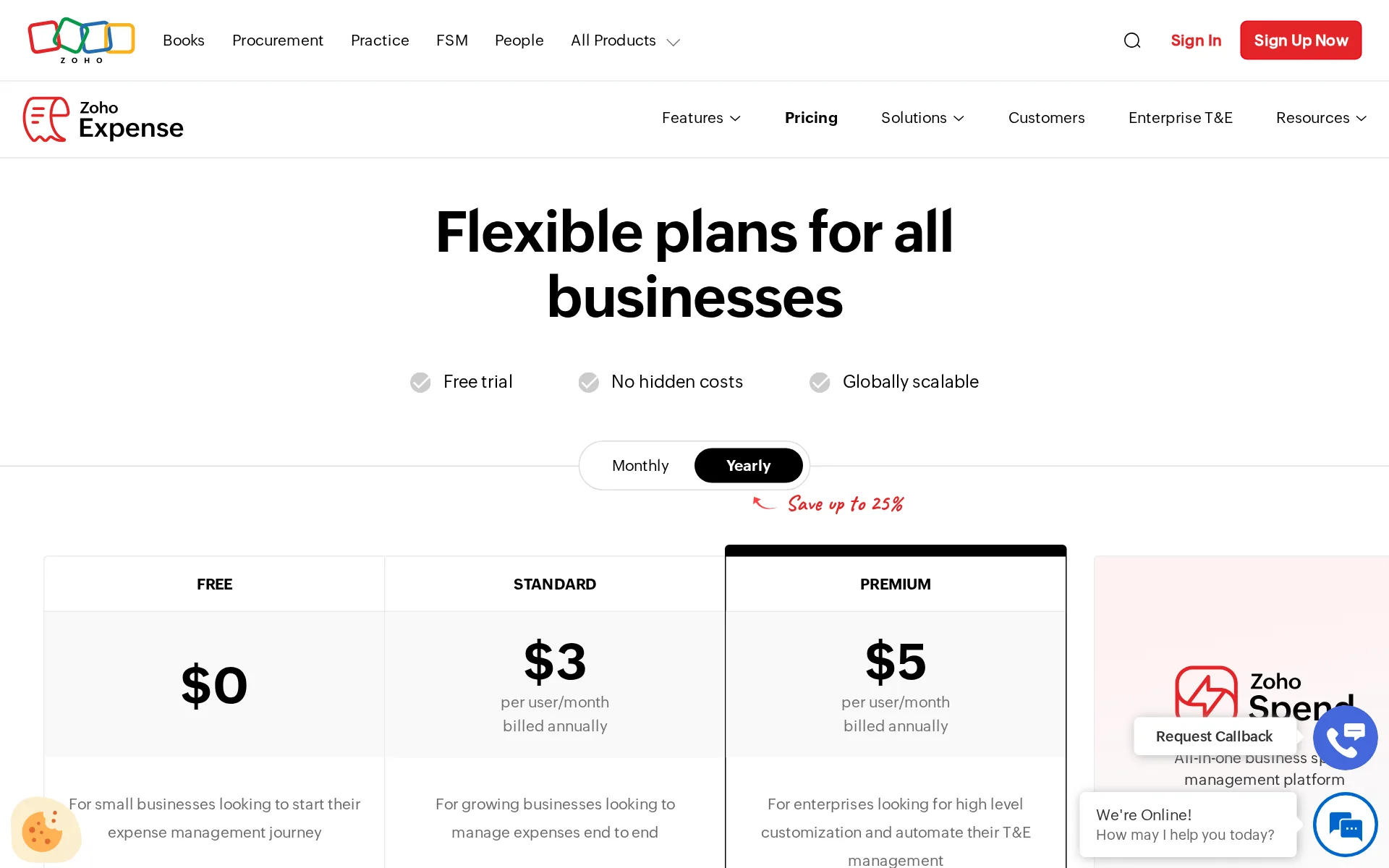
Pricing page, captured
zoho.com/us/expense/pricing, checked
What we checked on Zoho Expense
Cost for a solo freelancer
One freelancer can run a month at $0 on the Free plan with personal-card import, GPS mileage and receipt capture, but only 20 AI receipt scans a month.
Free and Trial: 20 receipt scans per user/month
zoho.com/us/expense/pricingChecked
Promotion and regular price
yearly shown monthly: the pricing page opens on the Yearly control, so the $3 and $5 per-user figures a visitor sees first are annual-billed rates, not the $4 and $6 month-to-month prices.
Save up to 25%
zoho.com/us/expense/pricingChecked
Ledger included
No ledger is included; Zoho Expense is a travel and expense system that pushes approved expenses into an accounting product you pay for separately.
Yes, Zoho Expense is a complete standalone travel and expense (T&E) management solution that works independently without requiring any other Zoho…
What the price is based on
Priced per user per month on each paid plan, with an active-user model that charges only users who actually create expenses in a cycle.
Yes. Zoho Expense offers an active-user pricing model, where you're billed based on users who actually create expenses or reports in a billing cycle…
Users included
The Free plan caps at three users; on paid plans each extra active user costs $4 monthly or $3 annually on Standard, $6 or $5 on Premium.
Additional users will be charged at: Standard plan: Monthly: $ 4 per user Yearly subscription: $ 3 per user Premium plan: Monthly: $ 6 per user…
zoho.com/us/expense/pricingChecked
Past your plan’s limits
Past the monthly Autoscan allowance you keep working but lose the AI scan: expenses must be keyed manually or receipts uploaded for records until the cycle resets.
Once you reach your monthly Autoscan limit, you can still create expenses manually or upload receipts for recordkeeping. Your receipt scanning quota…
zoho.com/us/expense/pricingChecked
Setup or onboarding fee
No mandatory setup charge, but guided onboarding is sold as the Jumpstart add-on from $500 with a dedicated expert, integrations and training.
Hands-on, guided onboarding is available through paid options: Premium Support (from $490/year) and the Jumpstart implementation program (from $500),…
What the AI does
Zia reads receipts, checks every claim against policy and spending history, and runs approval and reporting agents that submit reports on a schedule.
The Approval Agent fast-tracks low-risk expenses by combining policy intelligence, receipt validation, anomaly detection, and employee-behavior…
What the AI costs
included: Expense Intelligence with Zia AI, the agentic reporting and approval agents and Ask Zia are listed inside the Standard plan price, with no credit pack or AI add-on.
Expense Intelligence with Zia AI NEW Agentic AI expense reporting and Approval Ask Zia AI bot AI insights dashboard
zoho.com/us/expense/pricingChecked
Categorizes transactions
Zia categorizes each scanned receipt after the merchant's first expense is coded, and card transactions are auto-categorized from merchant category codes.
Zia auto-categorizes expenses as it reads each receipt: once you've categorized a merchant's first expense, every future expense from that merchant…
Reconciles your accounts
It reconciles corporate card transactions against expenses and receipts from the Standard plan up, not bank accounts against monthly bank statements.
Zoho Expense automatically matches corporate card transactions with the corresponding expenses and receipts using its reconciliation engine, flagging…
Reads receipts and bills
Photograph, forward by email or import a receipt and Zia extracts merchant, date, amount and line items, then matches it to the card transaction.
Zia automatically categorizes expenses and matches them to the corresponding card transactions. Simply snap a photo in the mobile app, forward…
Pays your bills
It reimburses employees and reconciles cards; the vendor says vendor-bill and AP processing is not what the product is built around, and routes that to Zoho Spend.
The honest caveat is that it's built around employee reimbursement and card expenses rather than high-volume vendor-bill/AP processing
People check the books
Zoho staff in India verify submitted receipts for accuracy, but policy and approval decisions sit with your own approvers, not with vendor bookkeepers.
In order to maintain accuracy of the receipts that you submit using Zoho Expense, all the receipts are subject to human verification by our personnel…
Your accountant can sign in
You can invite unlimited users at no charge, but anyone who creates an expense or report that cycle becomes a billable active user.
You can add as many users as you wish to Zoho Expense and they can use the product. However, if any of them create expenses or expense reports, they…
zoho.com/us/expense/pricingChecked
Accuracy the vendor claims
The vendor describes scanning as reliable and improving with learned merchants but publishes no measured accuracy rate or test method, and warns faint receipts need checking.
It performs best on printed receipts across the 38+ supported languages; faint thermal-paper receipts, handwriting, and unusual layouts still warrant…
QuickBooks Online
Zoho Books, QuickBooks Online, QuickBooks Desktop, Xero and Sage are native on every plan, while NetSuite, SAP, Oracle and Dynamics are a paid accounting software add-on for large companies.
Netsuite Add-on Add-on
Xero
Zoho Books, QuickBooks Online, QuickBooks Desktop, Xero and Sage are native on every plan, while NetSuite, SAP, Oracle and Dynamics are a paid accounting software add-on for large companies.
On the page: Plan comparison, Integrations > Accounting and ERP, Netsuite row
QuickBooks Desktop
Zoho Books, QuickBooks Online, QuickBooks Desktop, Xero and Sage are native on every plan, while NetSuite, SAP, Oracle and Dynamics are a paid accounting software add-on for large companies.
On the page: Plan comparison, Integrations > Accounting and ERP, Netsuite row
NetSuite
Zoho Books, QuickBooks Online, QuickBooks Desktop, Xero and Sage are native on every plan, while NetSuite, SAP, Oracle and Dynamics are a paid accounting software add-on for large companies.
On the page: Plan comparison, Integrations > Accounting and ERP, Netsuite row
Bank and card feeds
Real-time corporate card feeds from Visa, Mastercard, Amex and AirPlus pull transactions automatically in 12 countries; personal cards come in as statements, and there are no bank-account feeds.
Yes. Zoho Expense offers real-time card feeds that capture corporate card transactions as they happen, currently available across 12 countries in…
Stripe
The published add-on directory covers ledgers, Uber, Lyft, Bolt, Slack, Microsoft 365, VAT reclaim and cloud storage, but names no Stripe, Shopify, PayPal, Square or Gusto connector.
There's a lot you can do with our robust and powerful APIs. Take a look at our add-on partners listed below.
zoho.com/us/expense/addonsChecked
Shopify
The published add-on directory covers ledgers, Uber, Lyft, Bolt, Slack, Microsoft 365, VAT reclaim and cloud storage, but names no Stripe, Shopify, PayPal, Square or Gusto connector.
On the page: Integrations directory intro above the Accounting & Invoicing, Travel, Online Reimbursement, HR & Project Management, Collaboration and Other Apps groups
zoho.com/us/expense/addonsChecked
PayPal
The published add-on directory covers ledgers, Uber, Lyft, Bolt, Slack, Microsoft 365, VAT reclaim and cloud storage, but names no Stripe, Shopify, PayPal, Square or Gusto connector.
On the page: Integrations directory intro above the Accounting & Invoicing, Travel, Online Reimbursement, HR & Project Management, Collaboration and Other Apps groups
zoho.com/us/expense/addonsChecked
Square
The published add-on directory covers ledgers, Uber, Lyft, Bolt, Slack, Microsoft 365, VAT reclaim and cloud storage, but names no Stripe, Shopify, PayPal, Square or Gusto connector.
On the page: Integrations directory intro above the Accounting & Invoicing, Travel, Online Reimbursement, HR & Project Management, Collaboration and Other Apps groups
zoho.com/us/expense/addonsChecked
Gusto payroll
The published add-on directory covers ledgers, Uber, Lyft, Bolt, Slack, Microsoft 365, VAT reclaim and cloud storage, but names no Stripe, Shopify, PayPal, Square or Gusto connector.
On the page: Integrations directory intro above the Accounting & Invoicing, Travel, Online Reimbursement, HR & Project Management, Collaboration and Other Apps groups
zoho.com/us/expense/addonsChecked
Payroll
integration: payroll itself sits outside Zoho Expense, which syncs reimbursements and org structure to Zoho Payroll and other HRMS or payroll systems as an add-on.
Zoho Expense integrates with HRMS and payroll systems, including Zoho People and Zoho Payroll, to sync employee data, org structures, and…
Platforms
web, ios, android: it runs in any browser with native iPhone and Android apps, and the plan comparison also lists iPad, Mac and Apple Watch apps.
Zoho Expense is a fully cloud-based SaaS application, accessible through any web browser and through native iOS and Android apps. There's nothing to…
Getting your books out
The vendor states you own the data and can export it at any time with no lock-in contract; reports also download as Excel or CSV.
You own your data in Zoho Expense and can export it at any time. Zoho Expense is a pay-as-you-go service with no lock-in contract, so you can cancel…
Other currencies
Multi-currency expenses are on every plan including Free, with exchange rates applied automatically so staff spend in one currency and are repaid in another.
Yes. Zoho Expense supports multi-currency expenses on every plan, including the free plan, automatically applying exchange rates so employees can…
Mileage
Mileage tracking is built in on every plan with GPS logging, and Premium adds automatic capture with live trip tracking at IRS or custom rates.
Yes. Zoho Expense includes mileage tracking on every plan, with GPS-based logging, and adds automatic mileage capture with live trip tracking on the…
Profit by project or job
Customer and project tracking is on the Free plan, and expenses can be split and allocated across projects, cost centers, departments and locations.
Customer /project tracking
zoho.com/us/expense/pricingChecked
Funds for nonprofits
Grants and programs can be tracked through projects and custom codes, but the vendor says fund and grant accounting itself is out of scope and needs a ledger.
However, fund accounting, donor management, and grant accounting are outside the scope of an employee expense management system.
SOC 2 report
Zoho states SOC 2 Type II compliance across five trust principles with annual audits, plus SOC 1 Type II and ISO 27001; the report itself is requested from Zoho.
Zoho Corporation, which operates Zoho Expense, is SOC 2 Type II compliant across the Security, Confidentiality, Processing Integrity, Availability,…
For accounting firms
Accounting and bookkeeping firms get a client view through the separate Zoho Practice product; the plan list itself stops at Free, Standard, Premium and a custom enterprise quote with no firm tier.
Zoho Practice Exclusive for accounting and bookkeeping firms. Get complete insights of spend summaries and corporate card overviews, all within Zoho…
zoho.com/us/expense/addonsChecked
Several businesses
One account can run many subsidiaries with their own currencies, tax settings and policies, but multi-entity management starts on the Premium plan.
Zoho Expense offers multi-entity and multi-country expense management on its Premium and Enterprise plans, letting you run multiple subsidiaries or…
Canada
Localized editions cover the US, UK, Canada and Australia among others, with country tax rules and real-time card feeds across 12 North American and European countries.
Zoho Expense is built for global operations, with localized editions for the US, UK, Canada, India, UAE, Australia, Germany, Saudi Arabia, Singapore,…
Australia
Localized editions cover the US, UK, Canada and Australia among others, with country tax rules and real-time card feeds across 12 North American and European countries.
On the page: Product overview & core capabilities, 'Can Zoho Expense be used across multiple regions?'
Free trial or free plan
Two free routes: a standing Free plan for up to three users, and a 14-day trial of all features with no credit card required.
Yes. You can try Zoho Expense free for 14 days with no credit card, and there's also an ongoing free plan for up to 3 users.
Sign up without a sales call
You sign up and start any plan online and pay by card or PayPal; only the custom enterprise plan needs a quote from sales.
We accept payments via Visa, Mastercard, and American Express. We also accept PayPal and bank transfers for yearly subscriptions.
zoho.com/us/expense/pricingChecked
Contract and cancelling
Pay-as-you-go with no contract term: the vendor says you can start and stop the subscription whenever you like, monthly or yearly.
Zoho Expense is a pay-as-you-go service, so you are not bound by a contract to stay subscribed. You can start and stop your subscription with us any…
zoho.com/us/expense/pricingChecked
Support
Email is 8x5 on Free, paid plans add toll-free phone 8x5 with an 8-hour target, and $490/year Premium Support brings 24x5 email, phone and live chat.
Email Support 8 hours x 5 days 8 hours x 5 days 24 hours x 5 days Toll Free Support NO 8 hours x 5 days 24 hours x 5 days Remote Assistance NO YES…
Zoho Expense alternatives
All 9 alternatives6 more alternatives
5 of the 9 publish a price.
- Booke AINo list priceAn AI bookkeeper that works inside QuickBooks Online and Xero to categorize transactions and match documents.
- StampliOn quoteProcure-to-pay workspace for invoices, vendors, payments and card spend, with AI coding and routing.
- PilotNo list priceA bookkeeping and tax service for startups that pairs software-driven dashboards with human financial advisors.
- SimpleAIFrom $79 a monthAI agents that extract, classify and reconcile accounting documents, then publish them into Xero or QuickBooks.


Sources and changes
Last changed
Sources on zoho.com6
What changed on this page1
- Bookkeeping features, free plan, plan limits, prices, terms
Is this yours?
Make it yours for free, then check who reads this page, marked as verified. You confirm it with an email at zoho.com.
Report an error if a fact is wrong.