
Zoho Books in our research
What it costs
A month of books at 100 transactions
$20
a month at 100 transactions, on Standard
Checked against the maker's own pages, 26 October 2026.
Zoho Books price and plans
Prices excluding tax, as Zoho Books publishes them.
Free
Free
Trial
- Flat fee
Standard
$20 a month
- Flat fee
Professional
$50 a month
- Flat fee
- Adds Cost at 500 transactions a month
- Adds Inventory
- Adds Other currencies
- Adds Billable time
- Adds Profit by project or job
Premium
$70 a month
- Flat fee
Elite
$150 a month
- Flat fee
Ultimate
$275 a month
- Flat fee
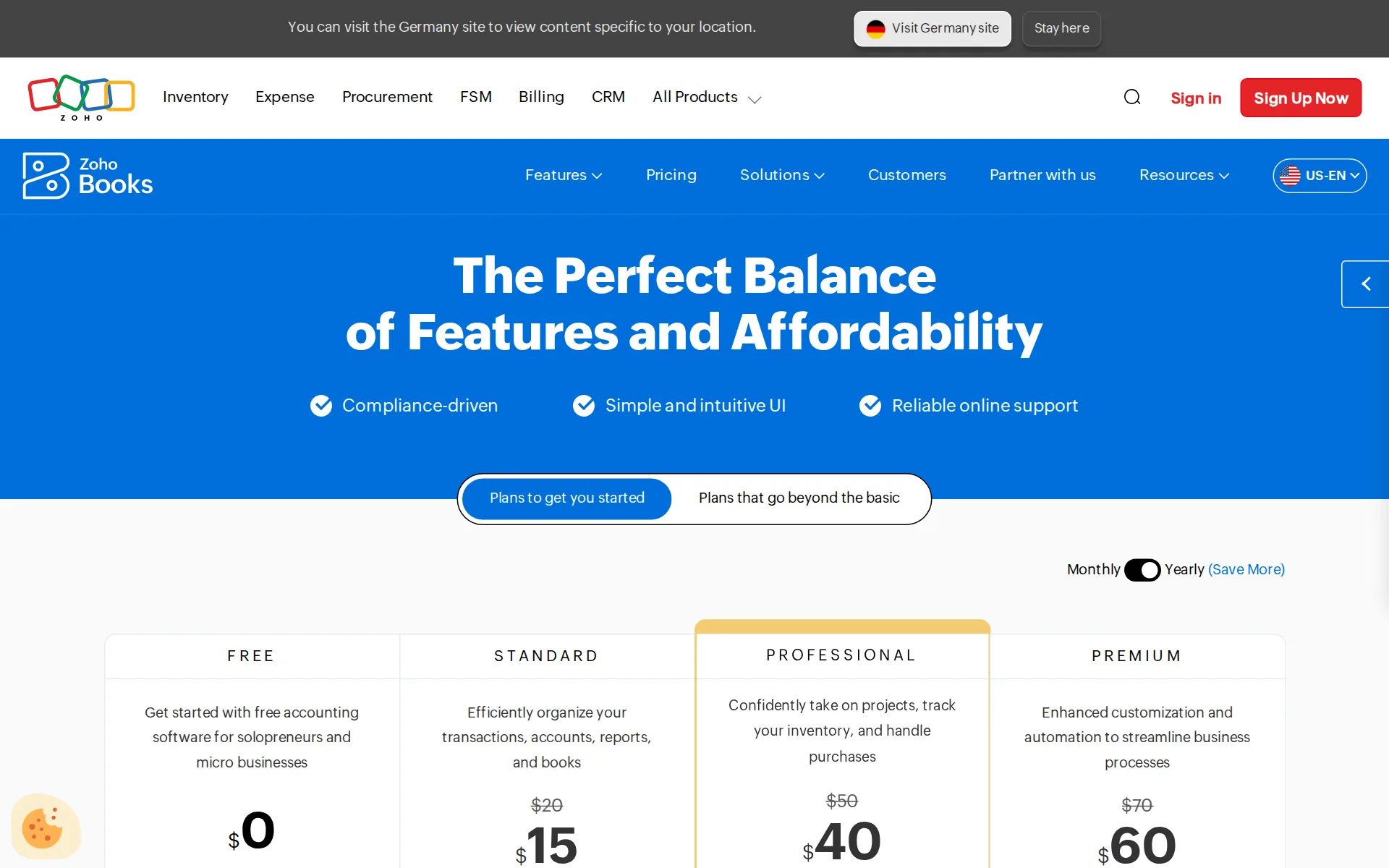
Pricing page, captured
zoho.com/us/books/pricing, checked
What Zoho Books costs at your volume
| Transactions a month | Cost | Plan |
|---|---|---|
| 100 transactions | $20 a monthon Standard | Standard |
| 500 transactions | $50 a monthon Professional | Professional |
What we checked on Zoho Books
Cost at 100 transactions a month
$20 a month on Standard for 100 transactions.
Efficiently organize your transactions, accounts, reports, and books
zoho.com/us/books/pricingChecked
Cost at 500 transactions a month
$50 a month on Professional for 500 transactions. Standard ($20) holds up to 5,000 transactions a year; the workload priced has 6,000 transactions a year.
Confidently take on projects, track your inventory, and handle purchases
zoho.com/us/books/pricingChecked
Cost for a solo freelancer
A freelancer with bank feeds and receipt capture needs the Standard plan at $20 per organization a month billed monthly, since bank feeds start there.
On the page: Plan cards, STANDARD card with the billing toggle set to Monthly
zoho.com/us/books/pricingChecked
Promotion and regular price
none — the $20 Standard rate is the standing month-to-month price; the lower $15 figure is simply the yearly billing rate, not a time-limited introductory offer.
Price/Org/Month Billed Annually
zoho.com/us/books/pricingChecked
Ledger included
Zoho Books is the accounting ledger itself, so no QuickBooks or Xero subscription sits underneath it; the plan fee covers invoicing, banking, journals and the reports.
Create invoices, quotes, expenses & journals
zoho.com/us/books/pricingChecked
What the price is based on
Flat per organization per month, independent of transaction volume; extra users, locations and bill pay are separately priced add-ons on top.
Price/Org/Month
zoho.com/us/books/pricingChecked
Users included
Free includes one user plus an accountant, Standard three, Professional five, Premium and Elite ten, Ultimate fifteen; extra users cost $3 each a month.
If you need more users, you can add them with the Zoho Books user add-on for $3 per user/month or $2.50 per user/month, billed annually.
zoho.com/us/books/pricingChecked
Past your plan’s limits
Each plan caps annual invoices and bills/expenses (5,000 a year on Standard) and the vendor's stated remedy is to email sales for a higher limit rather than a published overage rate.
If your company requires a higher invoice limit or needs further assistance, please don't hesitate to reach out to us at sales@zohocorp.com.
zoho.com/us/books/pricingChecked
What the AI does
Zia answers finance questions in plain English, flags anomalies in report data, pre-fills bank statement categorization, drafts emails and generates invoices, quotes and reports from a prompt.
AI in Zoho Books is built to improve real workflows, grounded on real data, and designed to save time where it matters.
What the AI costs
included — the AI page carries no separate price and the receipt autoscan allowance is part of the subscription, from 50 scans a month on Free to 1,000 on Premium and above.
The "receipt autoscans" feature can be availed as part of your subscription.
zoho.com/us/books/pricingChecked
Categorizes transactions
Zia pre-fills the account and vendor against each imported bank line, so it suggests rather than posts by itself, and the page does not claim it learns from your corrections.
Lighten your categorization. Zia pre-fills details against the statement based on available data saving you valuable time.
Reconciles your accounts
Bank and card accounts are reconciled inside the product, with matched and pending transactions in one view and reconciliation statements exportable as PDF per account and date range.
Filter by date or bank account and export comprehensive PDF bank reconciliation statements as you need.
Reads receipts and bills
Receipts can be photographed in the mobile app, uploaded or auto-forwarded from an email inbox, and autoscans turn them into transactions within a plan-wise monthly scan allowance.
Auto forward receipts from email inbox Receipt autoscans 50 per month 200 per month 200 per month 1,000 per month
Pays your bills
Bills and vendor approvals are in the paid plans, but paying vendors by ACH with two- and three-way matching is the separate BillPay add-on at $59 a month billed annually ($69 monthly).
100 ACH vendor payments
zoho.com/us/books/pricingChecked
Sends invoices
Invoices, recurring invoices, credit notes, payment reminders and a customer portal are on every plan, with online payment links and offline payments recorded against the invoice.
Recurring invoices Credit Notes Sales receipts Invoice customization Customer portal Multi-lingual invoicing Payment reminders Online payments…
Accrual books and reports
Profit and loss, balance sheet and cash flow sit among 70+ built-in reports you can run at any time; the pages read do not state whether the books are kept on a cash or accrual basis.
Run any report, including profit & loss, balance sheet, and cash flow, any time you need.
Your accountant can sign in
The Free plan is quoted as one user plus one accountant, so an accountant seat is free there; the paid plans are quoted only as user counts, with extra users at $3 a month.
1 User + 1 Accountant
Bank and card feeds
Banks and cards connect through third-party feed providers and statements are fetched periodically by themselves, with email auto-forwarding and file upload as fallbacks; feeds start on Standard, not Free.
Securely connect multiple bank and credit cards to automatically fetch bank statements periodically through third party partners/providers
Stripe
Stripe, PayPal, Square and Authorize.Net are supported payment gateways and Shopify stores connect on Elite and above (up to two)
On the page: Comparison table, Integrations section, Payment Gateways rows
Shopify
Stripe, PayPal, Square and Authorize.Net are supported payment gateways and Shopify stores connect on Elite and above (up to two)
On the page: Comparison table, Integrations section, Payment Gateways rows
PayPal
Stripe, PayPal, Square and Authorize.Net are supported payment gateways and Shopify stores connect on Elite and above (up to two)
On the page: Comparison table, Integrations section, Payment Gateways rows
Square
Stripe, PayPal, Square and Authorize.Net are supported payment gateways and Shopify stores connect on Elite and above (up to two)
On the page: Comparison table, Integrations section, Payment Gateways rows
Gusto payroll
the integrations directory returns no Gusto entry, listing SurePayroll and Zoho Payroll for payroll.
On the page: Comparison table, Integrations section, Payment Gateways rows
Payroll
integration — payroll is not in Zoho Books itself: it comes from the separately paid Zoho Payroll, or from a SurePayroll connection that posts payroll journal entries back.
A simple yet powerful accounting and payroll integration solution. Pay your employees on time, automate payroll journal entries and do much more…
zoho.com/us/books/addonsChecked
Moves your history in
Zoho moves your existing books across from QuickBooks or Xero at no charge, with assisted migration support rather than a paid onboarding package.
Switch to Zoho Books at no cost and experience stress-free, premium accounting.
Platforms
Runs in the browser on web, as a Windows desktop app from the Microsoft Store, on Mac through the browser (no Mac app named), and as native iPhone and Android apps.
Zoho Books is compatible with a wide range of devices, including desktops, Mac and Windows laptops, smartphones (including iPhones and Android…
zoho.com/us/books/pricingChecked
Getting your books out
Every report, profit and loss and balance sheet included, exports to PDF or spreadsheet; instant exports cap at 5,000 records for PDF and 20,000 for spreadsheets, larger ones run asynchronously.
For PDF reports, you can export reports with up to 5,000 records instantaneously. Other file formats (Zoho Sheet, CSV, XLS, and XLSX), support 20,000…
zoho.com/us/books/pricingChecked
Files 1099s
1099 contractors and W-9s are tracked on every plan and 1099-MISC and 1099-NEC can be e-filed with the IRS from inside Zoho Books, or exported for Tax1099 and Yearli.
Directly e-file your 1099-MISC and 1099-NEC forms with the IRS from Zoho Books, or export your 1099 data in an IRS-compatible format
Calculates sales tax
Sales and use tax is applied to invoices and tracked across the states where you register, with nexus guidance and sales tax reports for what you owe.
Zoho Books calculates tax across the states where you have added tax registrations
Files sales tax
Zoho Books reports what you owe and tracks sales and use tax, but filing, nexus monitoring and registration come from the paid Avalara integration on the Zoho Marketplace.
If your business has more advanced or complex tax requirements—such as requiring deeper compliance workflows, tax filing, nexus monitoring,…
Inventory
Stock quantities, reorder points and price lists arrive on Professional at $50 a month, with warehouses, batch and serial tracking only on Elite; Standard has no inventory.
Track inventory
zoho.com/us/books/pricingChecked
Other currencies
Multi-currency invoicing and transactions with automatic exchange rates need Professional at $50 a month; Free and Standard are single-currency.
Record multi-currency transactions
zoho.com/us/books/pricingChecked
Mileage
Mileage tracking is on every plan including Free: trips are logged by distance or odometer reading, and the mobile apps track the distance with GPS and convert it to an expense.
Automatically track mileage distances with GPS and convert it to expenses.
Billable time
Timesheets can be billed onto invoices from Professional at $50 a month; the two cheaper plans do not carry timesheet billing.
Bill timesheets
zoho.com/us/books/pricingChecked
Profit by project or job
Project profitability reporting starts on Professional at $50 a month, where projects, retainers and timesheets live; it is not in Free or Standard.
On the page: Plan cards, PROFESSIONAL feature list
zoho.com/us/books/pricingChecked
SOC 2 report
Zoho publishes a SOC 2 Type 2 report covering all of its cloud services, audited annually, with documented steps for customers to download it.
Zoho is SOC 2 Type 2 compliant. SOC 2 is an evaluation of the design and operating effectiveness of controls that meet the AICPA's Trust Services…
zoho.com/compliance.htmlChecked
For accounting firms
There is a partner program for accountants and bookkeepers with free Zoho One access, a dedicated partner account manager and a public partner listing; firm-level client billing and white-labeling are not described.
Leverage the power of a modern accounting platform for you and your clients. Join our partner program today
zoho.com/us/books/accountantChecked
Several businesses
Several businesses can run as separate organizations under one login, and because the fee is quoted per organization each additional business carries its own subscription.
Yes, absolutely. You can have multiple businesses set up as different organizations associated with your Zoho Books account
zoho.com/us/books/pricingChecked
Canada
Sold to US businesses with US sales tax and 1099 e-filing, and in separate country editions: Canada with GST/HST, the UK with MTD VAT filing to HMRC, and Australia with GST.
Sign up for MTD and file VAT returns directly to the HMRC.
zoho.com/uk/booksChecked
Australia
Sold to US businesses with US sales tax and 1099 e-filing, and in separate country editions: Canada with GST/HST, the UK with MTD VAT filing to HMRC, and Australia with GST.
On the page: UK edition homepage, 'File VAT' feature block
zoho.com/uk/booksChecked
Free trial or free plan
A standing Free plan lets you keep real books while your yearly revenue stays under $50K, and the paid plans come with a 14-day trial, so you can try it on your own data first.
As long as your revenue for the financial year does not exceed the threshold of $50K, Zoho Books's Free Plan is available indefinitely.
zoho.com/us/books/pricingChecked
Sign up without a sales call
You sign up with a company name, email and phone number and start immediately; the demo request and sales line are optional rather than a gate on buying.
It's simple to sign up for Zoho Books. Provide your company name, email address, and phone number on the Sign-up page, select a secure password, and…
zoho.com/us/books/pricingChecked
Contract and cancelling
Month to month by default with no contract required, cancellable yourself at any time; paying yearly is optional and drops Standard from $20 to $15 a month.
As Zoho Books is a pay-as-you-go service, you are not obligated to sign a contract or commit to continuing your subscription.
zoho.com/us/books/pricingChecked
Support
Free gets email support only; every paid plan adds voice and chat, with the US line and mailbox staffed Monday to Friday, 9am to 9pm ET.
Yes, basic support is available for all plans. The free plan comes with email support. Send your queries to support.usa@zohobooks.com any time. We…
zoho.com/us/books/pricingChecked
Zoho Books alternatives
All 9 alternativesHead to headZoho Books vs FreeAgent
6 more alternatives
6 of the 9 publish a price.
- Booke AINo list priceAn AI bookkeeper that works inside QuickBooks Online and Xero to categorize transactions and match documents.
- SimpleAIFrom $79 a monthAI agents that extract, classify and reconcile accounting documents, then publish them into Xero or QuickBooks.
- QuickBooks OnlineFree, then $38 a monthIntuit's cloud ledger, now with Intuit Intelligence agents that categorize, reconcile and flag errors.
- XeroFrom $27 a monthSmall-business ledger with a JAX assistant that answers questions in plain language; unlimited users on every plan.


Sources and changes
Last changed
Sources on zoho.com13
- /us/books/pricing
- /us/books/pricing/pricing-comparison.html
- /us/books/accounting-software/ai-in-accounting
- /us/books/accounting-software/bank-reconciliation
- /us/books/sales-tax-accounting-software
- /compliance.html
- /uk/books
- /us/books/accountant
- /us/books/accounting-mobile-apps
- /us/books/accounting-software-features/1099-tracking-w9-forms
- /us/books/accounting-software/accounting-financial-reports
- /us/books/addons
- /us/books/migration.html
What changed on this page1
- Bookkeeping features, free plan, plan limits, prices, terms
Is this yours?
Make it yours for free, then check who reads this page, marked as verified. You confirm it with an email at zoho.com.
Report an error if a fact is wrong.