
What it costs
A month of books at 100 transactions
Does not apply
No plan keeps a full set of books
Checked against the maker's own pages, 29 October 2026.
Synder price and plans
Prices excluding tax, as Synder publishes them.
Basic
$65 a month
Keeps no full set of books
- 500 transactions
Essential
From $129 a month
Keeps no full set of books
- 1,000 transactions
Pro
From $299 a month
Keeps no full set of books
- 10,000 transactions
- Adds Inventory
- Adds Profit by project or job
Pro Max
From $599 a month
Keeps no full set of books
- 20,000 transactions
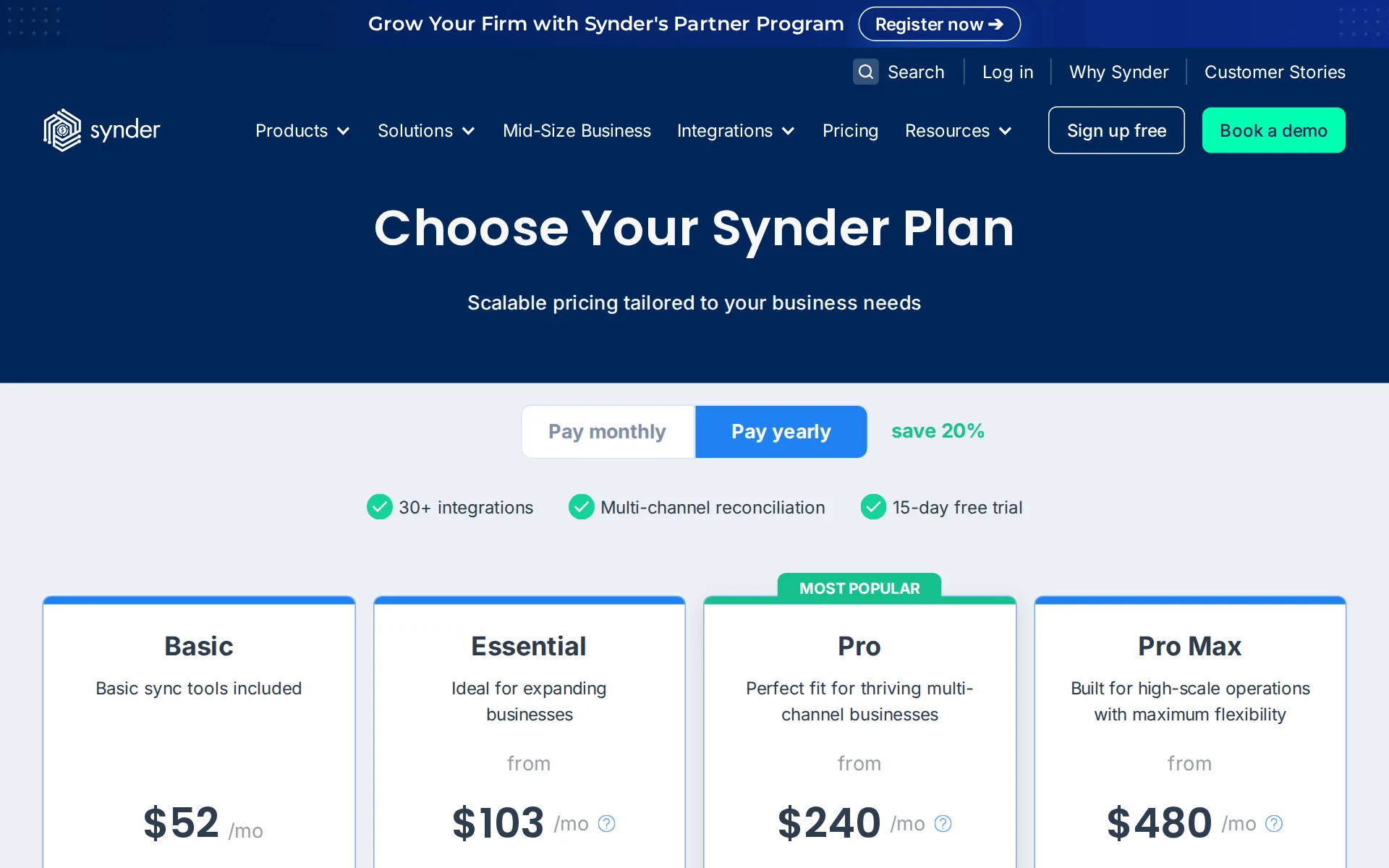
Pricing page, captured
synder.com/pricing, checked
What we checked on Synder
Cost for a solo freelancer
One freelancer at roughly 30 transactions fits the cheapest plan, Basic, at $65 a month billed monthly or $52 billed yearly, plus their own QuickBooks Online or Xero subscription, which Synder does not include.
Basic sync tools included $65 /mo
synder.com/pricingChecked
Promotion and regular price
Yearly shown monthly: Basic is shown at $52 per month billed yearly, with a 15-day trial.
$52/mo Billed yearly
synder.com/pricingChecked
Ledger included
Synder is not the ledger: it posts into an accounting system you pay for separately, and the entry plans reach only QuickBooks Online, Xero or Puzzle, so that subscription sits on top of Synder's fee.
Connect 30+ sales channels and payment processors to your accounting system and let transactions flow in automatically, so your books match what…
What the price is based on
Pricing is a flat monthly base per account set by the monthly transaction volume you sync, with each plan carrying an included allowance and higher volume billed separately within the same plan.
The final price is tailored to match your monthly transaction syncing needs within the plan limits.
synder.com/pricingChecked
Users included
Each plan includes a set number of additional users beyond the owner, one on Basic and Essential, two on Pro and Pro Max, unlimited on Premium, and further users cost a fee Synder does not publish.
Additional Synder users available based on your plan’s limit. Extra users can be added for a fee.
synder.com/pricingChecked
Past your plan’s limits
Passing the included sync allowance does not stop the service: extra syncs can be bought and the plan cards say higher volume is billed separately, but no per-transaction overage rate is published anywhere.
Imports are available within your sync limit (if exceeded, additional syncs can be purchased).
synder.com/pricingChecked
Catching up past months
Synder backfills past months by importing platform history from any start date, but history is a paid extra on Basic and Essential and only Pro and above include three free months; it is not a bookkeeper cleaning up existing books.
Paid unlimited history
synder.com/pricingChecked
Notice before a price rise
The terms promise no warning at all: CloudBusiness reserves the right to change the terms, the site, the products and the services at any time and without notice, and no price-increase notice period appears in them.
CloudBusiness reserves the right to modify, amend, suspend, terminate, upgrade, update or otherwise modify these Terms, the Site, the Products and…
synder.com/termsChecked
What the AI does
Synder opens its own workflows to outside AI assistants such as Claude and ChatGPT, and inside the product AI builds reports from a plain-English question and helps write the rules that categorize transactions.
Connect Claude, ChatGPT, Cursor, or any MCP-capable assistant and ask for what you need in plain language – a health check, your sync status, a P&L,…
What the AI costs
included: the AI report builder and the AI assistant connection are presented as part of the product, and the pricing page carries no AI add-on line, no credit bundle and no separate AI charge on any plan.
Type a question in plain English – "Top 10 products by revenue last quarter" – and AI builds the chart for you.
Categorizes transactions
Transactions are categorized as they sync by if-then rules you set, but those Smart Rules are a paid extra on Basic and Essential and only Pro and above include free ones; no page says the engine learns from your corrections.
Smart Rules are used for categorizing and refining transaction data
synder.com/pricingChecked
Reconciles your accounts
Reconciliation runs inside Synder on every plan: clearing-account lines are matched to the platform's own records, period balances are verified before summaries post, and payouts are split into charges, fees and refunds.
Match every line in your clearing account to the platform's own records – automated via API, standard upload, or custom mapping.
Sends invoices
Incoming payments are matched to open invoices, partial and split payments included, on every plan, but sending invoices from Synder is a paid extra: the invoicing row reads Paid in all five plan columns.
Invoicing Automated invoicing feature Paid
synder.com/pricingChecked
Accrual books and reports
Synder builds revenue recognition schedules for subscriptions and reports on its own data, a mini profit and loss among them, but the full profit and loss, balance sheet and cash flow statement come from the connected ledger.
16 curated starter reports cover the questions ecommerce sellers ask most – gross sales, AOV, gateway fees, top products, sales by channel, refunds,…
People check the books
No bookkeeper checks the output: Synder states it runs machines end to end with no human in the loop, so reviewing the mismatches it flags before they post is your job or your accountant's.
Synder protects its customer sensitive personally identifiable information (PII) and ensures that the data isn’t exposed to any Human-in-the-Loop…
synder.com/soctwoChecked
Your own bookkeeper
Synder assigns nobody to your books; it says no human touches the data, and the named person higher plans provide is a customer success manager for the software, not a bookkeeper or accountant.
Synder is an automated system all the way through, which means data privacy, absolute accuracy and lots of data processed in seconds.
synder.com/soctwoChecked
Your accountant can sign in
Every plan includes at least one additional user beyond the owner, one on Basic and Essential and two on Pro and Pro Max, so an accountant can be invited at no extra cost until that limit is used up.
On the page: Compare plans table, Additional users row
synder.com/pricingChecked
Accuracy the vendor claims
Synder advertises 100% reconciliation accuracy and 100% accurate data sync across its feature pages, but no page says what was measured, over which period or by whom, so the figure cannot be checked.
On the page: Auto Reconciliation hero metrics
QuickBooks Online
Synder posts into QuickBooks Online, QuickBooks Desktop, Xero, NetSuite, Sage Intacct and Puzzle, but the entry plans reach only QuickBooks Online, Xero and Puzzle
Synder integrates with QuickBooks Online, QuickBooks Desktop, Sage Intacct, NetSuite and Xero.
synder.com/pricingChecked
Xero
Synder posts into QuickBooks Online, QuickBooks Desktop, Xero, NetSuite, Sage Intacct and Puzzle, but the entry plans reach only QuickBooks Online, Xero and Puzzle
On the page: FAQ, 'Which accounting platforms does Synder integrate with?'
synder.com/pricingChecked
QuickBooks Desktop
Synder posts into QuickBooks Online, QuickBooks Desktop, Xero, NetSuite, Sage Intacct and Puzzle, but the entry plans reach only QuickBooks Online, Xero and Puzzle
On the page: FAQ, 'Which accounting platforms does Synder integrate with?'
synder.com/pricingChecked
NetSuite
Synder posts into QuickBooks Online, QuickBooks Desktop, Xero, NetSuite, Sage Intacct and Puzzle, but the entry plans reach only QuickBooks Online, Xero and Puzzle NetSuite and Sage Intacct start on Pro, and a custom accounting system for…
On the page: FAQ, 'Which accounting platforms does Synder integrate with?'
synder.com/pricingChecked
Bank and card feeds
Synder imports from your sales and payment platforms, hourly on Essential and above but only daily on Basic, and splits payouts so bank reconciliation ties; the bank and card feed itself belongs to the ledger it posts into.
Frequency of data imports from the connected integrations to the accounting platform
synder.com/pricingChecked
Stripe
More than 30 sales and payment platforms connect, Stripe, Shopify, PayPal, Square, Amazon, eBay and Etsy among them, while Magento, Walmart, TikTok and Clover are premium connections from Pro upwards.
Synder connects with 30+ popular sales and payment platforms, including Shopify, Amazon, eBay, Etsy, Stripe, PayPal, Square, and more.
synder.com/pricingChecked
Shopify
More than 30 sales and payment platforms connect, Stripe, Shopify, PayPal, Square, Amazon, eBay and Etsy among them, while Magento, Walmart, TikTok and Clover are premium connections from Pro upwards.
On the page: FAQ, 'What sales and payment platforms does Synder support?'
synder.com/pricingChecked
PayPal
More than 30 sales and payment platforms connect, Stripe, Shopify, PayPal, Square, Amazon, eBay and Etsy among them, while Magento, Walmart, TikTok and Clover are premium connections from Pro upwards.
On the page: FAQ, 'What sales and payment platforms does Synder support?'
synder.com/pricingChecked
Square
More than 30 sales and payment platforms connect, Stripe, Shopify, PayPal, Square, Amazon, eBay and Etsy among them, while Magento, Walmart, TikTok and Clover are premium connections from Pro upwards.
On the page: FAQ, 'What sales and payment platforms does Synder support?'
synder.com/pricingChecked
Payroll
integration: payroll is run by Gusto, and Synder's part is connecting Gusto to QuickBooks or Xero so employee lists and payment records move across without duplicates; Synder runs no payroll of its own.
Integrate your QuickBooks and Gusto platforms via Synder, and be able to assist with transferring employees’ lists and information from or into…
Platforms
web: Synder runs in a browser and lists only an internet connection, a modern browser and a connected accounting platform as requirements; no Windows, Mac, iPhone or Android app is advertised on the site.
Internet connection, modern web browser (Chrome, Firefox, Safari, Edge), active account with at least one supported accounting platform
synder.comChecked
Getting your books out
Your general ledger stays in QuickBooks or Xero, which you keep, and each reconciled period's audit trail can be downloaded; no page describes a full export of Synder's own transaction store.
every reconciliation has a full audit trail you can download or revisit
Files your tax return
Synder prepares records and then hands off: its own income-tax page points you to online tax preparation software for the filing, and no plan includes preparing or filing a return.
you can focus on tax filing with the help of online tax preparation software
Calculates sales tax
Synder takes the tax each platform collected and, when a rate is missing, works it out and maps it to the right code, assigning state, county and city jurisdictions from the shipping address on each sale.
If the rate isn't available, it calculates it and finds the matching tax code in your accounting system – across state, county, and city-level…
Files sales tax
Synder reports what you owe without filing or paying it: its own FAQ puts nexus tracking and obligation calculations with tools such as Avalara and keeps Synder to the recording side.
Synder focuses on the recording side – pulling tax data from your sales platforms and getting it into your accounting system with the right codes and…
Inventory
Stock quantities and cost of goods sold post with every sale and refund, but Basic and Essential can only use inventory items that already exist in your ledger; automatic creation of missing ones starts on Pro.
new inventory-type items cannot be created—only non-inventory items, which you’ll need to manually convert to inventory if required
synder.com/pricingChecked
Other currencies
Multicurrency is on every plan including Basic: each transaction posts at the rate actually charged and cross-currency payouts reconcile, while gain and loss accounting is left to the ledger's own currency features.
Processing and synchronization of transactions in multiple currencies
synder.com/pricingChecked
Profit by project or job
Synder applies classes and locations automatically so sales split by channel, store or program in the ledger, and QuickBooks locations mapping is reserved for Pro and above; it publishes no project profitability view of its own.
QuickBooks locations mapping supported
synder.com/pricingChecked
Funds for nonprofits
A nonprofit can have donations categorized and classes and locations applied automatically, which is how programs get tracked in the ledger, but Synder documents no restricted-fund or grant accounting of its own.
Categorize products, apply classes and locations automatically with our smart settings.
SOC 2 report
Synder holds a SOC 2 Type 2 report that customers can request by email, and it publishes a live trust report plus penetration testing by an outside security firm.
Synder’s SOC 2 Type 2 report is available for Synder customers upon request to help@synder.com
synder.com/soctwoChecked
For accounting firms
Accounting firms get a Partner Program priced by client count, 10% off all plans at three clients, 15% at seven and 20% at fifteen, plus a Firm Workspace holding clients and staff together and a directory listing.
3+ clients -10% on all plans
Several businesses
Several client organizations sit in one workspace where clients and staff are managed together and an agent can report on every organization at once; what each extra organization adds to the bill is not published.
Firm Workspace Quickly add additional stakeholders and manage clients and staff within one interface.
Free trial or free plan
You can run Synder on your own books for 15 days without paying and without a card, but there is no standing free plan and the vendor states purchases after that are non-refundable.
we offer a 15-day trial—no credit card required—so you can explore Synder before making a commitment
synder.com/pricingChecked
Sign up without a sales call
Basic and Essential are self-serve: start a trial, connect the platforms yourself and pay by card. Pro, Pro Max and Premium replace the sign-up button with Talk to sales and come with guided setup.
Self-serve setup
synder.com/pricingChecked
Contract and cancelling
You can pay month to month at the higher rate and the 20% saving requires a year, but the terms call every purchase final and non-cancelable, so stopping mid-term brings no refund.
all purchases are final and non-cancelable or non-refundable
synder.com/termsChecked
Support
Email support comes with every plan and sits in the standard queue, where Synder warns investigations may take over two weeks to begin; phone, live chat, Zoom and a named success manager arrive on Pro and above.
Email, phone/live chat, Zoom support, Dedicated CSM / fast-track tech support lane
synder.com/pricingChecked
Synder alternatives
All 9 alternatives6 more alternatives
5 of the 9 publish a price.
- PilotNo list priceA bookkeeping and tax service for startups that pairs software-driven dashboards with human financial advisors.
- Booke AINo list priceAn AI bookkeeper that works inside QuickBooks Online and Xero to categorize transactions and match documents.
- StampliOn quoteProcure-to-pay workspace for invoices, vendors, payments and card spend, with AI coding and routing.
- SimpleAIFrom $79 a monthAI agents that extract, classify and reconcile accounting documents, then publish them into Xero or QuickBooks.


Sources and changes
Last changed
Sources on synder.com13
What changed on this page2
- Bookkeeping features, free plan, plan limits
- Bookkeeping features, free plan, prices, terms
Is this yours?
Make it yours for free, then check who reads this page, marked as verified. You confirm it with an email at synder.com.
Report an error if a fact is wrong.