
What it costs
A month of books at 100 transactions
Does not apply
No plan keeps a full set of books
Checked against the maker's own pages, 27 October 2026.
Hubdoc price and plans
Prices excluding tax, as Hubdoc publishes them.
Hubdoc, on Xero Starter
$12 a month
Keeps no full set of books
- Flat fee
- Needs Xero Starter, $29 a month
Hubdoc, on QuickBooks Online Simple Start
$12 a month
Keeps no full set of books
- Flat fee
- Needs QuickBooks Online Simple Start, $38 a month
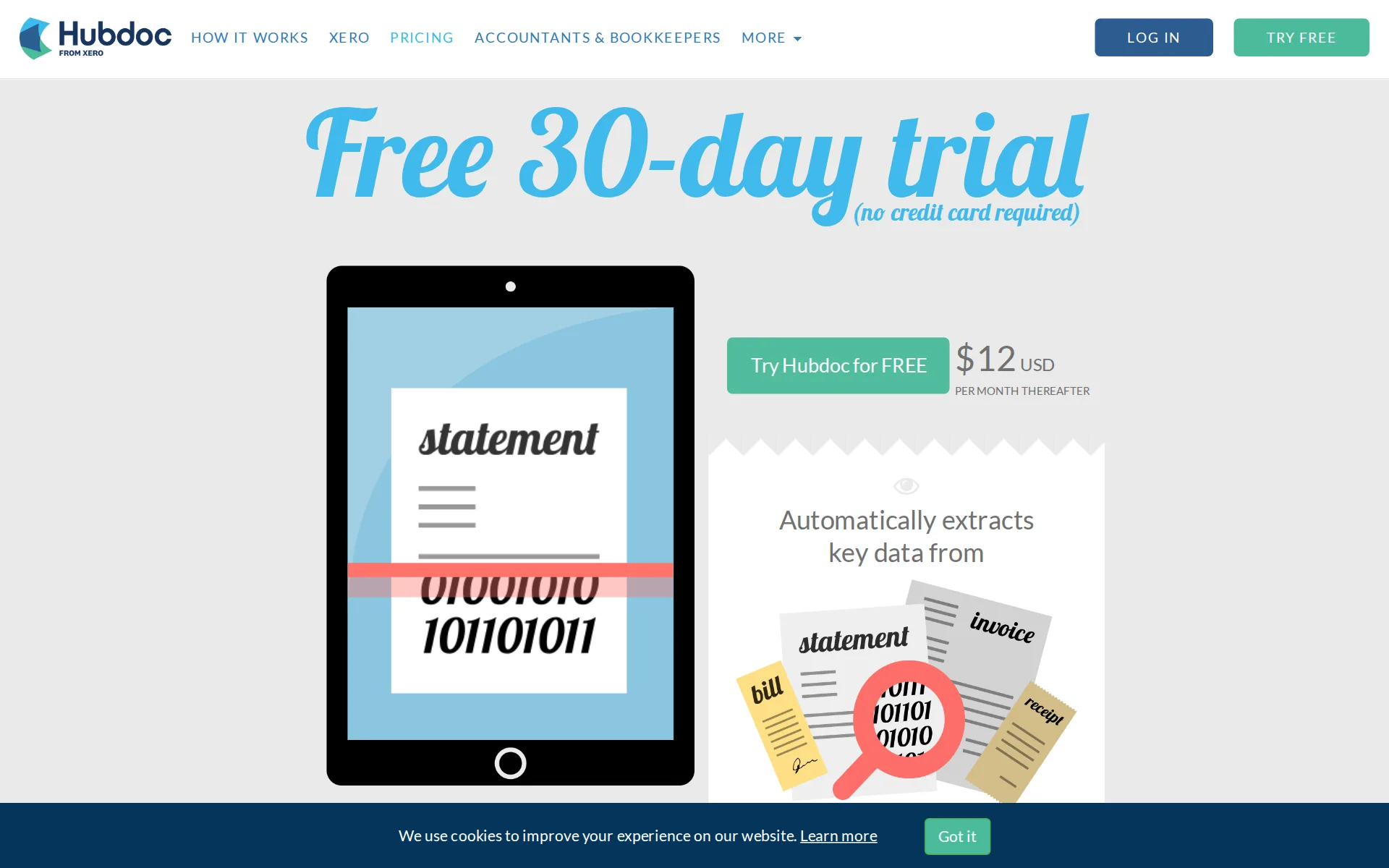
Pricing page, captured
hubdoc.com/pricing, checked
What we checked on Hubdoc
Cost for a solo freelancer
A freelancer pays one flat $12 USD a month for unlimited documents, with capture by phone, email or upload, but the ledger that records the transactions is a separate subscription on top.
$12USD PER MONTH THEREAFTER
hubdoc.com/pricingChecked
Promotion and regular price
none - the price shown first is a 30-day free trial rather than a discounted introductory rate, and the published rate after it is the standing $12 USD a month.
Free 30-day trial (no credit card required)
hubdoc.com/pricingChecked
Ledger included
Hubdoc is not a ledger: it creates transactions inside Xero or QuickBooks Online, so a buyer pays for one of those accounting subscriptions in addition to the $12 a month.
Supplier names, amounts, invoice numbers and due dates are extracted for you to create transactions in Xero and QuickBooks Online with the source…
hubdoc.comChecked
What the price is based on
Billing is a flat monthly fee per Hubdoc account rather than per transaction or per document; the partner page states the same $12 is charged once per client account.
Client accounts are USD $12 per month per client for unlimited documents and storage.
hubdoc.com/partnerpromotionChecked
Users included
The single plan includes multiple collaborators alongside its unlimited usage, though the pages never state a cap on how many people may be invited or any per-user charge.
Unlimited usage Multiple collaborators
hubdoc.com/pricingChecked
Past your plan’s limits
There is no allowance to pass: the plan is sold as unlimited usage, and the partner page prices client accounts for unlimited documents and storage, so no overage or cap policy applies.
On the page: Plan feature list, "Unlimited usage" heading
hubdoc.com/pricingChecked
Notice before a price rise
The Terms promise thirty days' notice of substantial changes to the terms themselves, by email or a posted notice, but nothing in them commits specifically to notice before a price increase.
Any changes to these Terms will be effective upon the earlier of thirty (30) calendar days following our dispatch of an e-mail notice to you (if…
hubdoc.com/termsChecked
What the AI does
The automation is data extraction and rule-based coding: it reads supplier, amount, invoice number and due date off documents, but the vendor never calls this AI and its Terms say extraction may be done by humans.
Hubdoc does the data entry by reading key information from bills and receipts and turning it into usable data.
hubdoc.comChecked
What the AI costs
included - automatic key-data extraction is the first feature listed on the single $12 plan, not an add-on or a credit purchase, and no separate extraction charge appears anywhere.
Automatically extracts key data from bills statements invoices receipts
hubdoc.com/pricingChecked
Categorizes transactions
Coding is driven by Supplier Rules you configure against a chart of accounts imported from the ledger, and it applies to captured documents rather than to every bank and card transaction; no learning from corrections is claimed.
Use Hubdoc's Supplier Rules to automate how receipts, bills and statements are coded.
hubdoc.com/how-it-worksChecked
Reconciles your accounts
Hubdoc auto-matches the transactions it publishes against the bank feed in the connected ledger, which supports one-click reconciliation there, but the monthly reconciliation of accounts to statements happens in Xero or QuickBooks, not in Hubdoc.
Hubdoc transactions are auto-matched with the bank feed in your accounting.
hubdoc.com/quickbooksChecked
Reads receipts and bills
You can photograph a receipt in the mobile app, forward it to a personal Hubdoc email address, scan it or upload it, and the extracted transaction is then matched to the ledger's bank feed.
Simply take a photo of your receipt, invoice or bill with our mobile app and throw out the paper copy. Hubdoc scans, extracts and stores your…
hubdoc.com/how-it-worksChecked
Pays your bills
Hubdoc captures and codes bills and pushes them into Bill.com, where approval and payment happen; Hubdoc itself never moves money and publishes no approval workflow of its own.
It's easy to create an automated workflow for your bills, from collection to payment and then synced to your accounting.
hubdoc.com/billcomChecked
People check the books
The Terms disclose that extraction may be done by human teams as well as software, but that is quality of data capture only - nobody reviews your books, and the vendor disclaims responsibility for accuracy.
Company offers a service that extracts some data from documents in your Account ("Data Extraction"). Data Extraction may be performed by software…
hubdoc.com/termsChecked
Your accountant can sign in
You grant your accountant access from inside the account and an email invite goes out; separately, advisors can hold their own free Hubdoc partner account for the practice.
Simply grant your accountant access to your account and an email invite will be sent.
hubdoc.comChecked
Accuracy the vendor claims
No accuracy rate is claimed anywhere; the Terms instead disclaim responsibility for the extracted data and warn that difficulties occur, and state the vendor does not review extracted data for accuracy.
While we strive to consistently extract accurate and timely data, we may sometimes encounter technical or other difficulties. Company is not…
hubdoc.com/termsChecked
QuickBooks Online
The plan's sync list names exactly two ledgers, Xero and QuickBooks Online, plus Bill.com for payables
Seamless syncing to Xero QuickBooks Online
hubdoc.com/pricingChecked
Xero
The plan's sync list names exactly two ledgers, Xero and QuickBooks Online, plus Bill.com for payables QuickBooks Desktop and NetSuite appear nowhere on the site, and no QuickBooks or Xero plan level is specified.
On the page: Plan feature list, "Seamless syncing to" row
hubdoc.com/pricingChecked
QuickBooks Desktop
QuickBooks Desktop and NetSuite appear nowhere on the site, and no QuickBooks or Xero plan level is specified.
On the page: Plan feature list, "Seamless syncing to" row
hubdoc.com/pricingChecked
NetSuite
QuickBooks Desktop and NetSuite appear nowhere on the site, and no QuickBooks or Xero plan level is specified.
On the page: Plan feature list, "Seamless syncing to" row
hubdoc.com/pricingChecked
Bank and card feeds
Hubdoc fetches bills and statements automatically from third-party websites using credentials you supply, which is document collection; the daily transaction feed itself belongs to the connected ledger.
Hubdoc is a document automation tool that collects key business documents (by automatically collecting documents from third party websites and by…
hubdoc.com/termsChecked
Stripe
Stripe, Shopify, PayPal, Square and Gusto are named nowhere on the site, in the plan table or elsewhere.
Publish your docs and their data directly to accounting software like Xero, QuickBooks Online and Bill.com.
hubdoc.com/how-it-worksChecked
Shopify
Stripe, Shopify, PayPal, Square and Gusto are named nowhere on the site, in the plan table or elsewhere.
On the page: "Integrates easily with other platforms" section, with the plan table's sync row and "Sync with Box" row
hubdoc.com/how-it-worksChecked
PayPal
Stripe, Shopify, PayPal, Square and Gusto are named nowhere on the site, in the plan table or elsewhere.
On the page: "Integrates easily with other platforms" section, with the plan table's sync row and "Sync with Box" row
hubdoc.com/how-it-worksChecked
Square
Stripe, Shopify, PayPal, Square and Gusto are named nowhere on the site, in the plan table or elsewhere.
On the page: "Integrates easily with other platforms" section, with the plan table's sync row and "Sync with Box" row
hubdoc.com/how-it-worksChecked
Gusto payroll
Stripe, Shopify, PayPal, Square and Gusto are named nowhere on the site, in the plan table or elsewhere.
On the page: "Integrates easily with other platforms" section, with the plan table's sync row and "Sync with Box" row
hubdoc.com/how-it-worksChecked
Payroll
none - payroll is absent from the plan's feature list and from the complete set of partners the site publishes, which covers only Xero, QuickBooks Online, Bill.com and Box.
On the page: Plan feature list, "Seamless syncing to" row - the only integration row on the plan
hubdoc.com/pricingChecked
Platforms
web, ios, android - it runs in any browser and has App Store and Google Play apps for phones and tablets; no Windows or Mac desktop application is offered.
Access all of your important documents from anywhere in the world. Use your browser or download the app on one of these preferred platforms
hubdoc.com/how-it-worksChecked
Getting your books out
You can download your documents and copy them to Box, and the data already published sits in your own ledger, but Hubdoc keeps no general ledger or trial balance to export.
Easy backup Download documents Sync with Box
hubdoc.com/pricingChecked
Profit by project or job
Through the Bill.com connection Hubdoc imports Classes and Departments and can code bills to them, but it reports no profit by project itself and no class support is claimed for the Xero or QuickBooks connections.
Hubdoc imports Accounts, Vendors, Classes and Departments from Bill.com.
hubdoc.com/billcomChecked
SOC 2 report
The security page states Hubdoc is in scope of parent Xero's SOC 2 Type II report and that Xero is ISO/IEC 27001 certified with annual external validation; it does not say how a buyer obtains a copy.
Hubdoc is a product of Xero Limited and is included as a service in scope of Xero's SOC 2 Type II report.
hubdoc.com/security-faqsChecked
For accounting firms
Accountants and bookkeepers get a free Hubdoc partner account for the practice and pay $12 a month per client account; the pages describe client management but claim no firm branding.
Advisors get a free Hubdoc Partner account for their practice
hubdoc.com/partnerpromotionChecked
Several businesses
Several businesses are handled as separate client accounts at $12 a month each, a structure the vendor publishes only for advisor practices; nothing describes several entities inside one business account.
On the page: Partner page, "Advisors get a free Hubdoc Partner account" section
hubdoc.com/partnerpromotionChecked
Canada
The Terms name contracting Xero entities for the USA, Canada, the UK, Australia and New Zealand, and the site switches locale between them, but no page addresses local bank coverage or any country's tax rules.
On the page: Terms of Use, section 12.1 Governing Law, entity and jurisdiction table
hubdoc.com/termsChecked
Australia
The Terms name contracting Xero entities for the USA, Canada, the UK, Australia and New Zealand, and the site switches locale between them, but no page addresses local bank coverage or any country's tax rules.
On the page: Terms of Use, section 12.1 Governing Law, entity and jurisdiction table
hubdoc.com/termsChecked
Free trial or free plan
A 30-day free trial with no credit card lets you run your own documents through it before paying; there is no standing free plan for a business after that.
On the page: Pricing page trial banner above the plan card
hubdoc.com/pricingChecked
Sign up without a sales call
Every call to action on the site goes straight to a signup form with no card and no call; a demo link exists on the partner page but is optional.
Try Hubdoc for FREE No credit card required
hubdoc.com/pricingChecked
Contract and cancelling
Billing is a monthly recurring charge with no annual commitment published, but the Terms state fees are billed in advance, are non-refundable and that payment obligations cannot be canceled, and no cancel-online promise appears.
All fees are billed in advance and are based on subscriptions purchased. Fees paid are non-refundable and payment obligations cannot be cancelled.
hubdoc.com/termsChecked
Support
Support runs through Xero Central's Hubdoc topic, with a separate help desk for people without a Xero login; the plan promises friendly tech support but no phone, chat or hours are published.
Hubdoc support is now available through Xero Central!
hubdoc.com/supportChecked
Hubdoc alternatives
All 9 alternatives6 more alternatives
5 of the 9 publish a price.
- Booke AINo list priceAn AI bookkeeper that works inside QuickBooks Online and Xero to categorize transactions and match documents.
- PilotNo list priceA bookkeeping and tax service for startups that pairs software-driven dashboards with human financial advisors.
- StampliOn quoteProcure-to-pay workspace for invoices, vendors, payments and card spend, with AI coding and routing.
- SimpleAIFrom $79 a monthAI agents that extract, classify and reconcile accounting documents, then publish them into Xero or QuickBooks.


Sources and changes
Last changed
Sources on hubdoc.com9
What changed on this page1
- Bookkeeping features, free plan, plan limits, prices, terms
Is this yours?
Make it yours for free, then check who reads this page, marked as verified. You confirm it with an email at hubdoc.com.
Report an error if a fact is wrong.