
Changed since our last check
Since we checked on .
- Cost for a solo freelancer: Yes, now Partly.
- Promotion and regular price: Partly, now No.
- Notice before a price rise: Partly, now Yes.
- Accrual books and reports: Yes, now Partly.
- When the month is closed: Yes, now Partly.
- Stripe: Partly, now Yes.
- PayPal: Yes, now No.
- Files 1099s: Partly, now Yes.
What it costs
A month of books at 100 transactions
$25
a month at 100 transactions, on Pulse
Checked against the maker's own pages, 28 October 2026.
doola price and plans
Prices excluding tax, as doola publishes them.
Starter
$24.75 a month
Keeps no full set of books
- Flat fee
Pulse
$25 a month
- Flat fee
- Adds Inventory
Tax and Compliance
$166.58 a month
- Flat fee
- Adds Files your tax return
Business-in-a-Box™
$329 a month
- Flat fee
- Adds Past your plan’s limits
- Adds Reconciles your accounts
- Adds Accrual books and reports
- Adds People check the books
- Adds Your own bookkeeper
- Adds When the month is closed
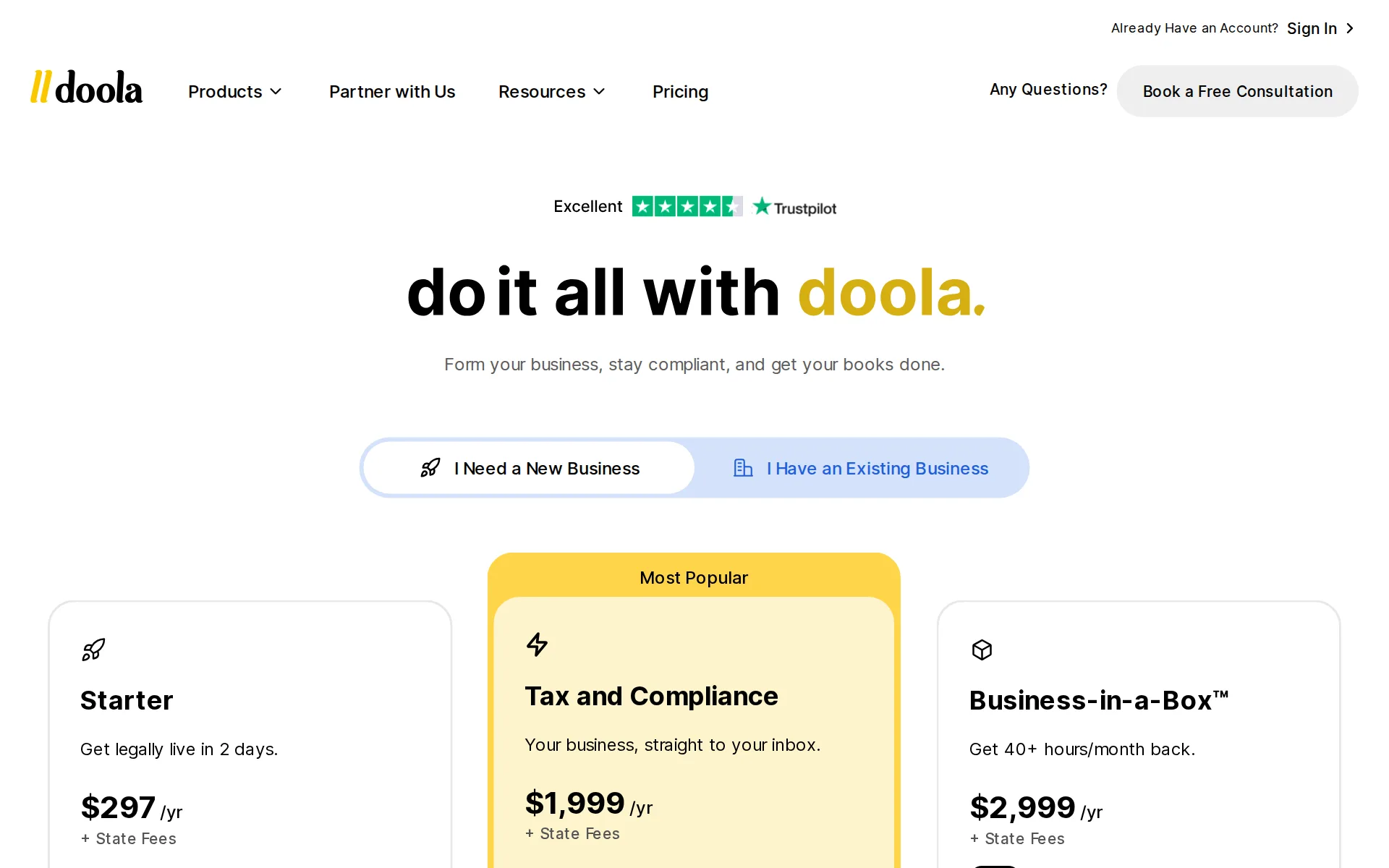
Pricing page, captured
doola.com/pricing, checked
What doola costs at your volume
| Transactions a month | Cost | Plan |
|---|---|---|
| 100 transactions | $25 a monthon Pulse | Pulse |
| 500 transactions | $25 a monthon Pulse | Pulse |
What we checked on doola
Cost at 100 transactions a month
$25 a month on Pulse for 100 transactions. Sold on annual billing only: monthly equivalent shown.
Starter is $297/yr, Pulse bookkeeping is $300/yr, Tax and Compliance is $1,999/yr, and Business-in-a-Box™ is $2,999/yr ($329/mo). All plans are…
doola.com/pricingChecked
Cost at 500 transactions a month
$25 a month on Pulse for 500 transactions. Sold on annual billing only: monthly equivalent shown.
On the page: Pricing FAQ, "How much does doola cost?" answer
doola.com/pricingChecked
Cost for a solo freelancer
The cheapest plan built for a one-person set of books is Pulse at $300 a year after a 30-day trial, which connects bank accounts and tracks transactions; nothing on the site says whether receipts can be captured on it.Was Yes before our last check.
$300/yr. Automated bookkeeping to track payouts, monitor expenses, and stay on top of your finances.
Promotion and regular price
none: the plan cards publish one standing yearly price each and the vendor states its pricing carries no hidden fees, so the figure shown first is not a first-term offer that later steps up.Was Partly before our last check.
We believe in transparent pricing that helps you grow. No hidden fees, no monthly charges.
doola.com/pricingChecked
Ledger included
doola keeps the books in its own software, so there is no separate QuickBooks Online or Xero subscription to buy; the software is named as part of the bookkeeping service itself.
Incl. Bookkeeping Software
doola.com/bookkeepingChecked
What the price is based on
Pricing is a flat fee for one business per year on every published plan, with state filing fees charged on top and paid through to the state rather than kept by doola.
All plans are billed annually.
Users included
The dashboard starts with the owner and a second user can be added, but doola publishes no seat count per plan and no per-user price; the request must go through support.
Contact Support from your owner email (or via the in-app Support form).
Past your plan’s limits
The dedicated bookkeeping service advertises unlimited transactions, so there is no stated ceiling to pass on that plan; no transaction allowance or overage rate is published for the cheaper plans.
Unlimited Transactions & Expert Support
doola.com/bookkeepingChecked
Setup or onboarding fee
The pricing page states there are no hidden fees on top of the plan price; the only extra named is state filing fees, which are government charges paid through doola rather than a setup fee it keeps.
State fees vary depending on the state, and are paid directly to the state through doola.
doola.com/pricingChecked
Catching up past months
doola runs a named catch-up service that organizes past records, files back taxes and hands over a year-end financial package for each year caught up; no price for it is published anywhere on that page.
We’ll provide a Year-End Financial Package for every year of catch-up bookkeeping, helping you get back on track, filed, and worry-free.
Notice before a price rise
The terms promise notice before a new price applies, but set no number of days: a change takes effect in the billing cycle that follows the notice, and continuing to use the service is treated as agreement.Was Partly before our last check.
Any change to our pricing or payment terms shall become effective in the billing cycle following notice of such change to you as provided in these…
doola.com/terms-of-serviceChecked
What the AI does
An AI assistant sits in the dashboard and answers questions about the business using its own data, pulling live bookkeeping summaries, analyzing ad spend, fetching documents and generating sales insights.
Co-Founder Actions lets you: Pull live bookkeeping summaries, Analyze your ad spend, Download company documents, Generate E-commerce sales insights
doola.com/ai-cofounderChecked
What the AI costs
included: the AI assistant comes with every plan at no extra charge, but it is metered in credits that differ by plan and renew each billing cycle, so the amount of AI you get is set by which plan you buy.
Each credit equals 30 exchanges (one message sent and one received). Credits renew automatically every billing cycle—monthly or annually, depending…
doola.com/ai-cofounderChecked
Categorizes transactions
Transactions are tracked and categorized for you and the AI assistant does smart categorization, but the vendor says you may still have to weigh in on particular items, and nothing says it learns from your corrections.
While occasional input from you may be needed for specific transaction categorizations, we aim to make the bookkeeping process as effortless as…
Reconciles your accounts
Accounts are reconciled every month by the bookkeeper, which is why this needs the plan that carries a dedicated bookkeeper; the comparison table marks monthly and quarterly closings as absent on the cheaper plans.
Your bookkeeper will categorize your transactions, reconcile your accounts, generate your financial statements and close your books for tax time by…
Sends invoices
You can create and send invoices from the product, and it syncs with Stripe so customer payments come through; the site does not say the payment is matched back to the invoice automatically.
Create and send professional invoices in seconds. Sync with Stripe for seamless payments.
doola.com/bookkeepingChecked
Accrual books and reports
Monthly financial statements covering profit and loss, balance sheet and cash flow come with the dedicated bookkeeper plan; no page states whether the books are kept on an accrual or a cash basis.Was Yes before our last check.
P&L, balance sheet, and cash flow reports
doola.comChecked
People check the books
A human bookkeeper does and reviews the books from start to finish, but only on the plan that includes one; on the cheaper plans the software is described as do-it-yourself and checking the numbers is yours.
With dedicated bookkeeping, a human bookkeeper will get to know your business, bring your books up to date, and do your book for you, start to finish.
Your own bookkeeper
A named bookkeeper who knows your business is part of the top plan and is reachable by email for questions; the comparison table marks the dedicated bookkeeper as absent on every cheaper plan.
Keeps your finances in check, organizes your books, and prepares monthly reports. Got questions? They’re just an email away.
doola.com/bookkeepingChecked
When the month is closed
The vendor commits to closing the books monthly and quarterly but publishes no date or number of days by which a month's close and its reports are finished, so the actual turnaround is unknown.Was Yes before our last check.
We close your books monthly & quarterly—accurate, tax-ready, and hassle-free. Need help? We’re always here.
doola.com/bookkeepingChecked
Your accountant can sign in
A second user can be given dashboard access at no price doola publishes, but it is not self-serve: only the account owner or an authorized admin can request it through support.
Security note: For your protection, we can only take user-add requests from the account owner or an authorized admin on the account.
Bank and card feeds
Plans from Pulse upward connect multiple bank accounts and bring transactions in automatically; the vendor names neither the connection provider nor how often the feed refreshes.
On the page: Feature comparison table, 'Bookkeeping & Analytics' block, 'Connect Multiple Bank Accounts' row
doola.com/pricingChecked
Stripe
Stripe, Shopify and Amazon are named as connections, together with Google, Meta and TikTok ad accountsWas Partly before our last check.
Connect Shopify, Amazon, and your ad platforms
doola.comChecked
Shopify
Stripe, Shopify and Amazon are named as connections, together with Google, Meta and TikTok ad accounts
On the page: 'Take Control of Every Dollar.' bullet list
doola.comChecked
PayPal
nothing read mentions PayPal, Square or Gusto.Was Yes before our last check.
On the page: 'Take Control of Every Dollar.' bullet list
doola.comChecked
Square
nothing read mentions PayPal, Square or Gusto.
On the page: 'Take Control of Every Dollar.' bullet list
doola.comChecked
Gusto payroll
nothing read mentions PayPal, Square or Gusto.
On the page: 'Take Control of Every Dollar.' bullet list
doola.comChecked
Payroll
integration: doola runs no payroll itself and points customers to discounted rates with its partner Gusto; it does not document payroll data flowing back into doola Books.
As a doola customer, you have access to discounted services with our payroll partner Gusto.
Platforms
web: doola runs in a browser as a dashboard you sign in to, and every call to action leads to that web app; no page read names a Windows, Mac, iPhone or Android app.
AI Co-Founder is your built-in assistant, integrated into your doola Dashboard.
doola.com/ai-cofounderChecked
Getting your books out
Financial reports can be downloaded in one click and the comparison table lists downloadable reports on every bookkeeping plan, but nothing says you can export the whole ledger or a trial balance if you leave.
One-click financial reports
doola.com/ai-cofounderChecked
Files your tax return
Federal and state business tax returns are prepared and filed by licensed professionals from the Tax and Compliance plan upward, and the terms add that no return is filed until at least $1,500 has been collected for that tax year.
To begin and complete the preparation and filing of any tax return, a minimum of $1,500 USD in payments must be received per tax year.
doola.com/terms-of-serviceChecked
Files 1099s
doola advertises filing Form 1099 for the contractors you pay and invites you to book a call about it; the page does not say which plan includes it or what it costs.Was Partly before our last check.
No stress, no confusion—just fast, accurate 1099 filing. We handle the details so you stay compliant and worry-free.
doola.com/tax-filingChecked
Quarterly tax estimates
Estimated quarterly taxes are listed as part of the top plan only, and the terms warn that these are estimates doola is not responsible for beyond the year-end position.
On the page: 'What’s Included in Business-in-a-Box™' bullet list
doola.com/bookkeepingChecked
Files sales tax
doola states it does not provide sales tax services directly and refers customers to partner Numeral for registration, filing and remittance; the top plan includes free Numeral registration only.
Although doola doesn't provide sales tax registration services directly, we recommend a trusted partner
Inventory
Stock levels are monitored through the e-commerce analytics that come with Pulse and above, flagging best sellers and low stock; nothing says it tracks the cost of goods sold in the books.
Never run out. Spot best-sellers, slow movers, and low-stock items instantly.
doola.com/analyticsChecked
Other currencies
The software handles US dollars only: invoice currency cannot be changed, and non-USD bank transactions need the account management team before you proceed.
You cannot change the currency type in your doola invoice. doola invoices only support USD currency.
Your data trains AI
The vendor states your information is used only to answer your own questions and for nothing else, and that it is encrypted in transit and at rest and never sold or shared; no opt-out is offered because none is said to be needed.
Your information is only used to generate responses relevant to your questions—never for any other purpose.
doola.com/ai-cofounderChecked
Australia
Nothing supports Canadian, UK or Australian entities, banks or sales tax.
The Easiest Way to Start and Run Your U.S. Business.
doola.comChecked
Free trial or free plan
The bookkeeping software can be tried free for 30 days before any payment, and the pricing page shows that trial as the Pulse plan's way in; after it the plan renews at $300 a year.
Try our Bookkeeping Software free for 30 days.
Sign up without a sales call
Every plan card leads straight to a sign-up in the web app and the vendor puts the whole intake at under ten minutes; a free consultation and a demo call are offered alongside but are not required.
Answer a few questions about your business, where you’re based, and what you need.
doola.comChecked
Contract and cancelling
The vendor states every plan is billed annually, and its terms make payments nonrefundable with access running to the end of the paid period; you can close the account yourself or by email, so no call is needed to cancel.
All payments are nonrefundable, and there are no refunds or credits for partially used periods in the event of a subscription. Following any…
doola.com/terms-of-serviceChecked
Support
Email support comes with every plan and scheduled live calls are added from the Tax and Compliance plan upward, where the entry plan is marked as not having them; no phone line, chat channel or support hours are published.
Live Call Scheduling
doola.com/pricingChecked
doola alternatives
All 9 alternatives6 more alternatives
6 of the 9 publish a price.
- PilotNo list priceA bookkeeping and tax service for startups that pairs software-driven dashboards with human financial advisors.
- Booke AINo list priceAn AI bookkeeper that works inside QuickBooks Online and Xero to categorize transactions and match documents.
- SimpleAIFrom $79 a monthAI agents that extract, classify and reconcile accounting documents, then publish them into Xero or QuickBooks.
- Bookkeeper360From $19 a monthUS-based outsourced bookkeeping, tax and CFO team working in your QuickBooks Online or Xero.


Sources and changes
Last changed
Sources28
- doola.com/pricing
- doola.com/bookkeeping
- doola.com/ai-cofounder
- doola.com/
- doola.com/bookkeeping/catch-up
- doola.com/terms-of-service
- doola.com/bookkeeping/doola-vs-quickbooks
- help.doola.com/add-a-second-user-to-your-account-steps-invite-and-troubleshooting
- help.doola.com/business-in-a-box-whats-included-benefits-and-pricing
- doola.com/pricing
- doola.com/products/total-compliance
- help.doola.com/subscription-and-add-on-service-pricing
- doola.com/analytics
- help.doola.com/can-doola-books-automate-my-bookkeeping-process-doola-help-center
- help.doola.com/can-doola-help-me-with-payroll-doola-help-center
- help.doola.com/can-i-connect-doola-books-to-multiple-bank-accounts-doola-help-center
- help.doola.com/can-i-export-my-reports-from-doola-analytics
- help.doola.com/can-i-use-doola-analytics-on-mobile
- help.doola.com/how-can-i-update-the-currency-in-my-invoice-doola-help-center
- help.doola.com/how-long-does-it-take-to-do-my-bookkeeping-each-month-doola-help-center
- help.doola.com/how-to-contact-doola-support-doola-help-center
- doola.com/tax-filing
- help.doola.com/understanding-irs-tax-filing-service-pricing-and-options
- help.doola.com/what-are-the-steps-for-uploading-banking-transactions-to-doola-books-doola-help-center
- help.doola.com/what-if-my-bank-transactions-are-not-in-usd
- help.doola.com/what-is-doola-pulse-plan
- help.doola.com/what-reports-are-available-in-doola-books-doola-help-center
- help.doola.com/what-sales-tax-services-does-doola-offer
What changed on this page2
- Bookkeeping features, free plan, prices, terms
- Bookkeeping features, free plan, plan limits, terms
Is this yours?
Make it yours for free, then check who reads this page, marked as verified. You confirm it with an email at doola.com.
Report an error if a fact is wrong.