
What it costs
A month of books at 100 transactions
Does not apply
No plan keeps a full set of books
Checked against the maker's own pages, 28 October 2026.
BILL price and plans
Prices excluding tax, as BILL publishes them.
Essentials
$49 per user a month
Keeps no full set of books
- Flat fee
Team
$65 per user a month
Keeps no full set of books
- Flat fee
- Adds What the AI costs
Corporate
$89 per user a month
Keeps no full set of books
- Flat fee
- Adds Several businesses
Spend & Expense
Free
Keeps no full set of books
- Flat fee
What needs a higher plan
- Enterprise
- QuickBooks Online, Xero, NetSuite
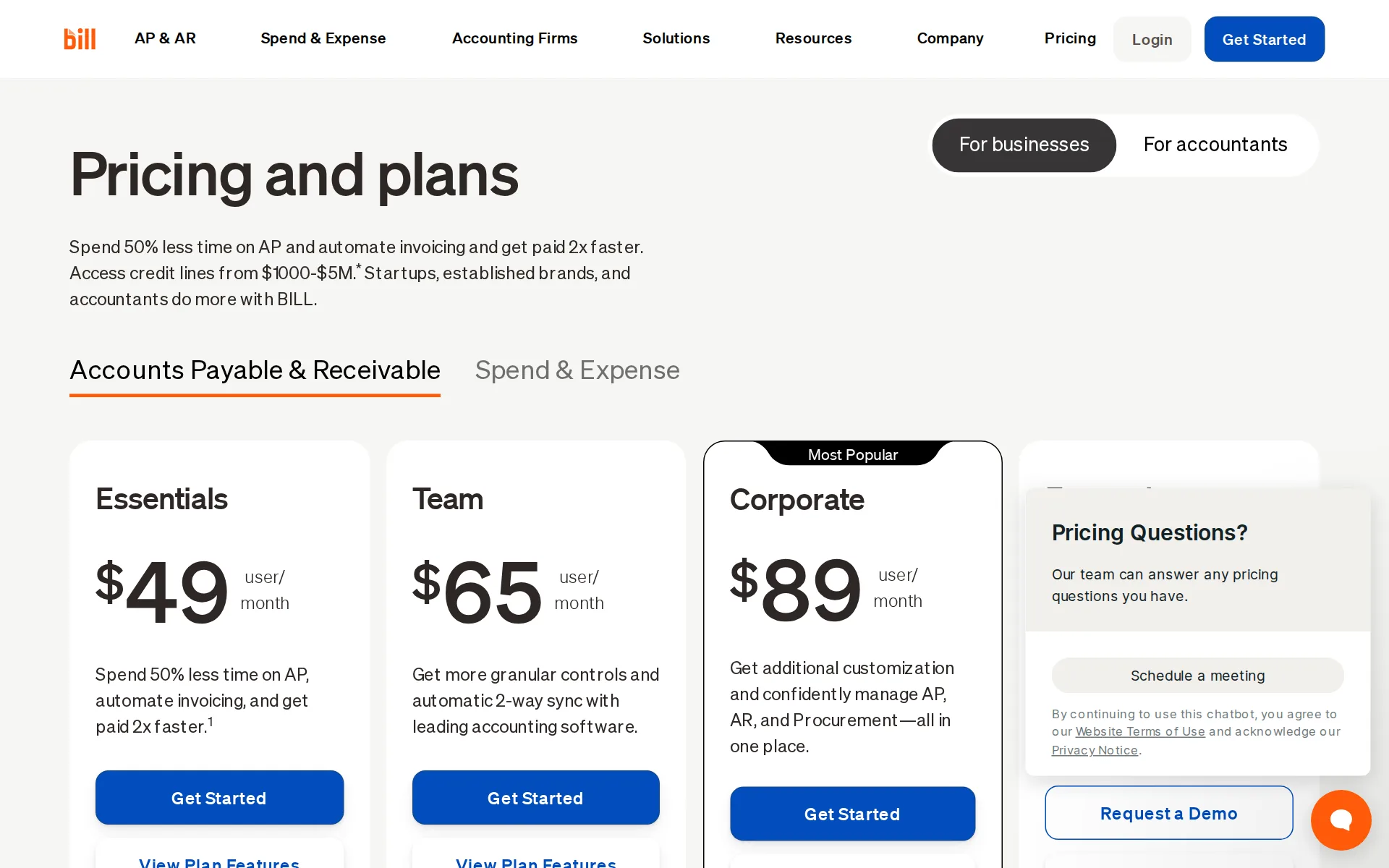
Pricing page, captured
bill.com/product/pricing, checked
What we checked on BILL
Cost for a solo freelancer
One freelancer pays $49 a user each month on Essentials, the cheapest paid plan, plus per-payment fees such as $0.59 an ACH payment; BILL does not keep books or import bank transactions.
Essentials $49 user/month
bill.com/product/pricingChecked
Ledger included
BILL is not your accounting software: it syncs two ways into QuickBooks Online, QuickBooks Pro/Premier and Xero, which you pay for separately, or exchanges CSV files with anything else.
Automatic 2-way sync with QuickBooks Online, QuickBooks Pro, QuickBooks Premier, and Xero
bill.com/product/pricingChecked
What the price is based on
Priced per user each month for bills and invoices, with payment fees charged per payment on top, so the bill moves with headcount and with how much you pay out.
BILL Accounts Payable and Accounts Receivable are offered in subscription plans (such as Essentials, Team, and Corporate) that are priced per user…
bill.com/product/pricingChecked
Users included
No seats are bundled: every user is billed, at $49, $65 or $89 a month by plan, and only Corporate and Enterprise offer cheaper approver-only seats.
every user on Essentials and Team is billed as a standard user, and Corporate/Enterprise plans distinguish between full feature users and lower-cost…
bill.com/product/pricingChecked
Notice before a price rise
The terms promise advance notice of a material fee increase but name no number of days, and your only remedy is to stop using BILL or cancel.
BILL will provide advanced notice of any material increase of a change in Service Fees. If the increase in Service Fees is not acceptable, Your sole…
What the AI does
AI reads incoming invoices and extracts fields, codes multi-line bills, emails vendors to collect W-9s, matches receipts to card transactions and flags unusual bill amounts during approval.
BILL's AI automatically reads incoming invoices, extracts key fields, codes multi-line bills, reducing time and increasing accuracy.
bill.com/product/aiChecked
What the AI costs
included in the plan at no extra charge, but the Invoice Coding Agent that codes multi-line bills is not included on Essentials and starts on Team at $65 a user each month.
On the page: Compare All plans, BILL Accounts Payable table, Invoice Coding Agent row
bill.com/product/pricingChecked
Categorizes transactions
AI codes bills and card transaction fields inside BILL, but these are bills and card spend, not bank transactions in your books, and no page claims it learns from your corrections.
BILL helps complete transactions for you by matching receipts to transactions and automatically categorizing transaction fields.
bill.com/product/aiChecked
Reads receipts and bills
The mobile app captures receipts and AI matches them to card transactions and codes them, so a photographed receipt lands against its transaction without manual entry.
AI-powered receipt capture, matching, and transaction coding
bill.com/product/pricingChecked
Pays your bills
This is BILL's core job: bills arrive in a central inbox, route through approval policies you set, then pay by ACH, check, virtual card, credit card or international transfer.
Manage bills from a centralized inbox
bill.com/product/pricingChecked
Sends invoices
Every plan creates custom invoices, sends single or recurring ones, automates payment reminders, takes ACH and credit card, and can auto-charge the customer.
Create professional, custom invoices
bill.com/product/pricingChecked
People check the books
Nobody at BILL checks the AI's work for you: the vendor's pitch is that automation keeps you in the chair, with final approval and an audit log of every AI action on your side.
Shift from manual processing to high-value strategic work, while keeping final decision-making power.
bill.com/product/aiChecked
Your accountant can sign in
An outside accountant can be added, but on Essentials and Team every user is billed at the plan rate; firms instead buy the Accountant Console at $49 a month to reach client accounts.
For Essentials/Team customers, every user is billed as a standard user.
bill.com/product/pricingChecked
Accuracy the vendor claims
BILL claims its W-9 agent collects and enters W-9s with 95+ accuracy; the figure carries a footnote marker only, and no method or sample behind it is published on the page.
BILL's AI autonomously emails your vendors to collect and enter W-9s with 95+ accuracy.
bill.com/product/aiChecked
QuickBooks Online
QuickBooks Online, Pro and Premier and Xero sync two ways from Team upward and by CSV on Essentials, while QuickBooks Enterprise, NetSuite, Sage Intacct and Dynamics need Enterprise.
QuickBooks Enterprise Not included Not included Not included Automatic 2-way sync* Oracle NetSuite Not included Not included Not included Automatic…
bill.com/product/pricingChecked
Xero
QuickBooks Online, Pro and Premier and Xero sync two ways from Team upward and by CSV on Essentials, while QuickBooks Enterprise, NetSuite, Sage Intacct and Dynamics need Enterprise.
On the page: Compare All plans, Integrations table
bill.com/product/pricingChecked
NetSuite
QuickBooks Online, Pro and Premier and Xero sync two ways from Team upward and by CSV on Essentials, while QuickBooks Enterprise, NetSuite, Sage Intacct and Dynamics need Enterprise.
On the page: Compare All plans, Integrations table
bill.com/product/pricingChecked
Stripe
no page names Stripe, Shopify, PayPal, Square or Gusto feeds.
Integrations include Tallie, HubDoc, Tax1099, and Earth Class Mail.
bill.com/integrationsChecked
Shopify
no page names Stripe, Shopify, PayPal, Square or Gusto feeds.
On the page: Frequently asked questions, "What other tools do BILL Accounts Payable and BILL Accounts Receivable integrate with?"
bill.com/integrationsChecked
PayPal
no page names Stripe, Shopify, PayPal, Square or Gusto feeds.
On the page: Frequently asked questions, "What other tools do BILL Accounts Payable and BILL Accounts Receivable integrate with?"
bill.com/integrationsChecked
Square
no page names Stripe, Shopify, PayPal, Square or Gusto feeds.
On the page: Frequently asked questions, "What other tools do BILL Accounts Payable and BILL Accounts Receivable integrate with?"
bill.com/integrationsChecked
Gusto payroll
no page names Stripe, Shopify, PayPal, Square or Gusto feeds.
On the page: Frequently asked questions, "What other tools do BILL Accounts Payable and BILL Accounts Receivable integrate with?"
bill.com/integrationsChecked
Platforms
web in the browser, plus ios on iOS 16 or later and android on Android 7.0 or later; the app mirrors the browser app rather than standing alone, and no Windows or Mac download is offered.
The mobile app is currently available for Android 7.0 or later and iOS 16 or later.
bill.com/product/mobile-appChecked
Getting your books out
You can export your BILL data as CSV files for any accounting software, but BILL holds bills, invoices and card spend, so there is no full ledger, trial balance or report set to take out.
Easily export data in CSV files to use with your accounting software and import files configured to work with BILL.
bill.com/integrationsChecked
Files 1099s
BILL e-files 1099s to the IRS at $2.99 each, $1.99 through the Accountant Console, with direct state filing at $1.49 and mailing to vendors at $1.99, and collects W-9s by AI first.
1099 E-filing to IRS $2.99 (per 1099) 1099 E-filing to IRS via Accountant Console $1.99 (per 1099) 1099 Direct State Filing $1.49 (per 1099) 1099…
bill.com/product/pricingChecked
Other currencies
You can pay vendors in local currencies across 130+ countries and receive EUR or GBP invoice payments, but BILL is not your ledger, so accounts are not kept in other currencies here.
Make international payments in more than 130 countries
SOC 2 report
BILL undergoes an annual SOC 1 and SOC 2 Type II audit covering Accounts Payable, Accounts Receivable and Spend & Expense; the page does not say how a customer requests a copy.
BILL adheres to the SOC 1 and SOC 2 compliance standards of the American Institute of CPAs (AICPA), undergoing an annual SOC 1 and SOC 2 Type II…
bill.com/product/securityChecked
For accounting firms
Firms get an Accountant Console at $49 a month to manage many clients, wholesale subscription pricing they can resell, a further 10-20% client discount by volume, and NASBA-certified CPE training.
BILL offers an Accountant console at $49/month that provides access to manage multiple clients, resell AP/AR services, and includes NASBA-certified…
bill.com/product/pricingChecked
Several businesses
Multi-entity and multi-location accounting is included on Corporate at $89 a user each month and Enterprise, and is marked not included on Essentials and Team.
Multi-entity, multi-location accounting capabilities Not included Not included Included Included
bill.com/product/pricingChecked
Australia
no page names Australian banks or GST.
You can use and download the app when traveling abroad, but it supports only US accounts when signing up for BILL.
bill.com/product/mobile-appChecked
Free trial or free plan
Spend & Expense is $0 a user each month and stays free, and the paid AP and AR plans come with a free trial in most cases, so you can try before paying.
Yes, the BILL Spend & Expense plan is $0 per user per month and includes corporate cards, budgets, expense tracking, and access to credit lines from…
bill.com/product/pricingChecked
Sign up without a sales call
Essentials, Team and Corporate each carry a Get Started button and a published rate you can buy yourself, while Enterprise is custom priced and routes to Request a Demo.
Enterprise Custom Pricing Unlock enhanced security, premium support, multi-location accounting capabilities, and more. Request a Demo
bill.com/product/pricingChecked
Contract and cancelling
Subscriptions renew each billing cycle rather than on a yearly commitment, and you cancel in your own account or through the support portal, effective at the end of the current cycle.
Your Subscription Account will automatically renew each billing cycle unless You request to deactivate a User or cancel Your account.
Support
Live chat and phone are offered on all plans, with email too, but premium phone support is Enterprise only and the hours live in the Help Center rather than on the pricing page.
Live chat and phone support for all plans Visit the Help Center to connect with a support advocate and learn more about business hours.
bill.com/product/pricingChecked
BILL alternatives
All 9 alternatives6 more alternatives
5 of the 9 publish a price.
- StampliOn quoteProcure-to-pay workspace for invoices, vendors, payments and card spend, with AI coding and routing.
- Booke AINo list priceAn AI bookkeeper that works inside QuickBooks Online and Xero to categorize transactions and match documents.
- PilotNo list priceA bookkeeping and tax service for startups that pairs software-driven dashboards with human financial advisors.
- SimpleAIFrom $79 a monthAI agents that extract, classify and reconcile accounting documents, then publish them into Xero or QuickBooks.


Sources and changes
Last changed
Sources on bill.com7
What changed on this page1
- Bookkeeping features, free plan, plan limits, prices, terms
Is this yours?
Make it yours for free, then check who reads this page, marked as verified. You confirm it with an email at bill.com.
Report an error if a fact is wrong.