
What it costs
A month of books at 100 transactions
$10
a month at 100 transactions, on Accountant
- Accountanthelp.zipbooks.com$0
- USD per client account license a month$10
- Added up$10
Checked against the maker's own pages, 28 October 2026.
ZipBooks price and plans
Prices excluding tax, as ZipBooks publishes them.
Starter
Free
Keeps no full set of books
- Flat fee
Smarter
$15 a month
Keeps no full set of books
- Flat fee
- Adds What the AI does
- Adds What the AI costs
- Adds Categorizes transactions
- Adds Your accountant can sign in
- Adds Bank and card feeds
- Adds Moves your history in
Sophisticated
$35 a month
- Flat fee
- Adds Users included
- Adds Reconciles your accounts
- Adds Profit by project or job
- Adds Funds for nonprofits
Accountant
Free
- Flat fee
- Plus USD per client account license a month, $10 a month
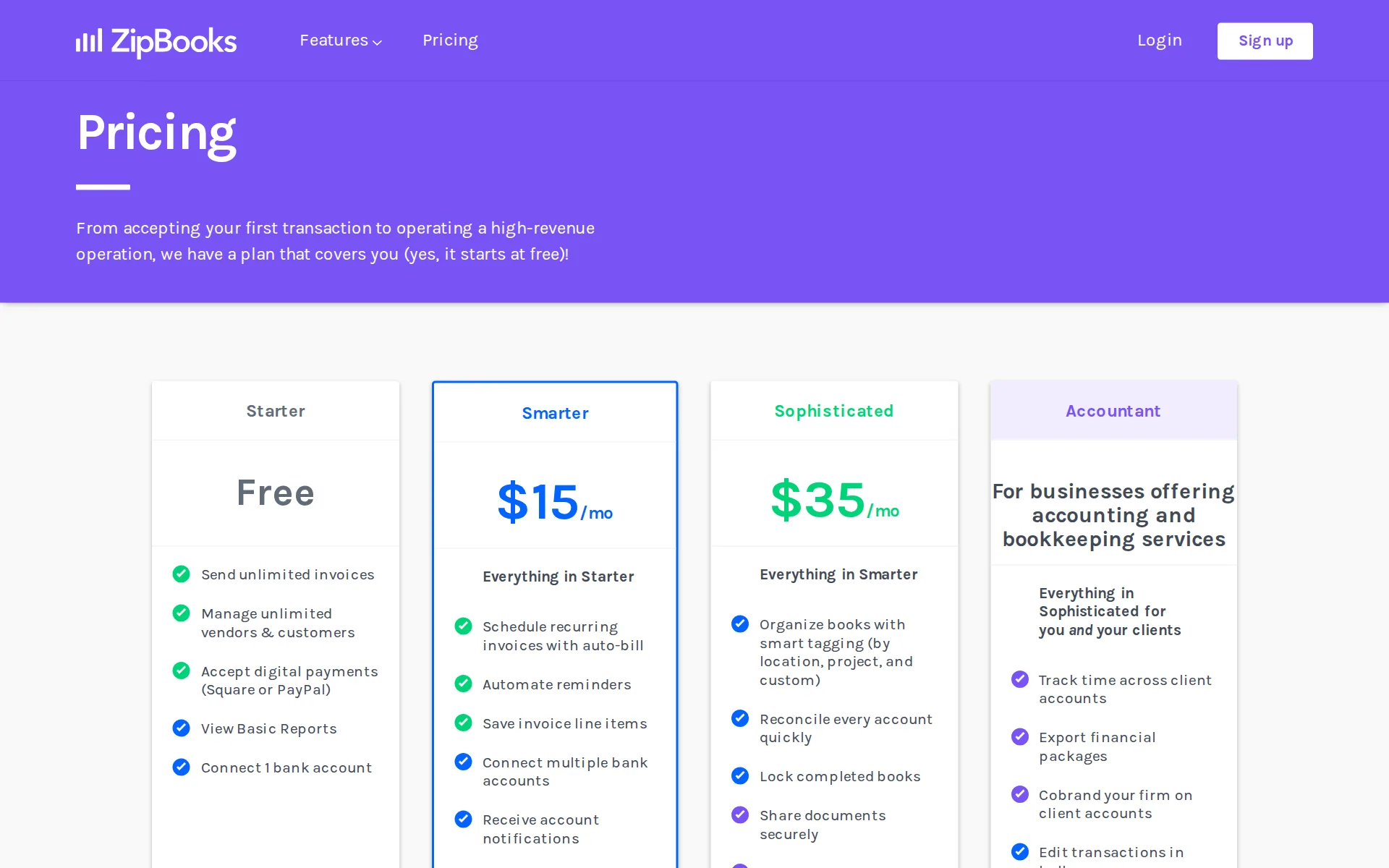
Pricing page, captured
zipbooks.com/pricing, checked
What ZipBooks costs at your volume
| Transactions a month | Cost | Plan |
|---|---|---|
| 100 transactions | $10 a monthon Accountant | Accountant |
| 500 transactions | $10 a monthon Accountant | Accountant |
What we checked on ZipBooks
Cost at 100 transactions a month
$10 a month on Accountant for 100 transactions. Includes required fees: USD per client account license a month $10.
Your account is free, and client account licenses are $10 each per month.
Cost at 500 transactions a month
$10 a month on Accountant for 500 transactions. Includes required fees: USD per client account license a month $10.
On the page: Help article on signing up for the Accountant plan, pricing line
Cost for a solo freelancer
A freelancer with about 30 transactions a month can stay on the free Starter plan, which connects one bank account and stores receipts, so the monthly cost is nothing.
Connect 1 bank account
zipbooks.com/pricingChecked
Promotion and regular price
none: the plan cards publish $15 and $35 a month as the standing prices, with no introductory period, countdown or struck-through figure anywhere on the pricing page.
Sophisticated
zipbooks.com/pricingChecked
Ledger included
ZipBooks is the ledger itself: double-entry books, chart of accounts, income statement and balance sheet are in the subscription, so you pay for no other accounting product.
Does ZipBooks do double-entry ("real") accounting? Absolutely.
What the price is based on
A flat monthly fee for one business: $15 for Smarter and $35 for Sophisticated, not counted per transaction, per bank account or per user.
On the page: Pricing page, Smarter plan card, price cell showing $15/mo
zipbooks.com/pricingChecked
Users included
The free Starter plan has no team members at all, Smarter adds five, and only Sophisticated invites unlimited users, so extra people mean a plan upgrade rather than a seat price.
Add 5 team members
zipbooks.com/pricingChecked
What the AI does
Machine learning picks a category for every imported transaction, attaches a confidence score and learns from your corrections, but this sits on the paid plans rather than free Starter.
When ZipBooks imports your bank transactions, we’ll categorize them, and give you a confidence score based on our accounting expertise and your own…
What the AI costs
included in the plan fee rather than metered: the Smarter plan at $15 a month carries the machine-learning categorization row, and nothing is billed per suggestion or in credits.
Automate categorization with personalized Machine Learning
zipbooks.com/pricingChecked
Categorizes transactions
It chooses a category for each bank and card transaction and relearns when you fix one, though the comparison table leaves the row blank for the free Starter plan.
If you find that something’s categorized wrong, simply make a correction, and ZipBooks will learn from its mistakes
Reconciles your accounts
You reconcile accounts by ticking off transactions against the statement balance, but the plan cards list quick reconciling of every account only from the $35 Sophisticated plan.
Reconcile every account quickly
zipbooks.com/pricingChecked
Reads receipts and bills
Receipts are uploaded or dragged onto the transaction you pick and stored with it on every plan; the documented steps are manual, with no reading of the receipt or automatic matching.
Scroll to the bottom of the window and you’ll see a box with the words “Drop to upload.”
Pays your bills
Bills are entered with vendor, due date and attachments and then marked paid by recording the payment yourself; no approval routing or paying the vendor from ZipBooks is documented.
When you want to record a payment made to a bill, find it in your list, open it, and click on the blue Add Payment button
Sends invoices
Unlimited invoices and estimates on every plan, card or PayPal and Square payments, recurring auto-bill and reminders on paid plans, and payments post straight into the books.
ZipBooks lets you create and send beautiful invoices and estimates in seconds and accept credit cards with the click of a button.
zipbooks.comChecked
Accrual books and reports
Every plan, the free one included, can switch its income statement and balance sheet between cash and accrual, and cash flow reports are available too.
Switch between cash and accrual reporting
zipbooks.com/pricingChecked
People check the books
Checking the books is yours to do: the vendor describes correcting miscategorized transactions yourself, and the plans buy software plus chat support, not a bookkeeper's review.
On the page: Auto-Categorization page, Machine Learning section
Your accountant can sign in
An accountant is added as a team member with all relevant permissions in one click, but team members start on the $15 Smarter plan and count against its five places.
Or simply check “Add as Accountant” to give them all relevant permissions.
Bank and card feeds
Bank and card transactions stream in automatically once the account is verified, with balances pulled daily; the free Starter plan connects one account, paid plans several.
Once we verify your account, all your transactions will be streamed in automatically.
Stripe
Square, Stripe and PayPal connect for payments and Gusto for payroll, each with its own setup article
Integrate with other small business software (Gusto)
zipbooks.com/pricingChecked
Shopify
nothing on the site addresses Shopify sales or payouts.
On the page: Pricing page, plan comparison table, integrations row
zipbooks.com/pricingChecked
PayPal
Square, Stripe and PayPal connect for payments and Gusto for payroll, each with its own setup article
On the page: Pricing page, plan comparison table, integrations row
zipbooks.com/pricingChecked
Square
Square, Stripe and PayPal connect for payments and Gusto for payroll, each with its own setup article
On the page: Pricing page, plan comparison table, integrations row
zipbooks.com/pricingChecked
Gusto payroll
Square, Stripe and PayPal connect for payments and Gusto for payroll, each with its own setup article
On the page: Pricing page, plan comparison table, integrations row
zipbooks.com/pricingChecked
Payroll
integration only: payroll itself is run in Gusto, which is connected on the integrations page and synced back to ZipBooks after employees are mapped; ZipBooks runs no payroll.
On the Integrations page, choose Gusto with the Connect Now button, then log in to your Gusto account
Moves your history in
Past books come in as a CSV of transactions mapped to ZipBooks' template, and that import is a paid-plan feature; the vendor's QuickBooks migration guide no longer resolves.
PLEASE NOTE: Importing using the CSV templates is a feature of paid plans only.
Platforms
web only in practice: it runs in any browser with a mobile-friendly layout you can pin to a phone, and the vendor says its phone app has been discontinued.
The ZipBooks app has been discontinued as we work on developments and integrate it with new features that are currently in the works.
Getting your books out
Transactions export to CSV and every report, including the trial balance and general ledger, exports to PDF or CSV; Sophisticated adds a whole financial package export.
Choose whether you’d like to export a PDF or CSV file
Files your tax return
ZipBooks files nothing itself; the vendor says it works with outside tax partners who handle state and federal returns, with no plan or price given for that.
ZipBooks also works with reliable, prompt tax partners who can take care of state and federal taxes regardless of your entity type.
Files 1099s
Payments can be marked as 1099 expenses and totaled per contractor in a 1099 Summary report, but the vendor says that report is not a tax form and you file each 1099.
just remember that this is only a summary, not an official tax form. You’ll need to file individual 1099s for each vendor (or contractor)
Calculates sales tax
Taxes are added on invoices on every plan and a Taxes Invoiced report totals what you collected by tax name, but no state-by-state rates or liability tracking are described.
The report that appears will list the Tax Name (each type of tax you collect), and the Taxable Amount and Taxes Collected for each.
Files sales tax
It reports what you collected and then tells you to check the rules and pay the tax yourself; no filing or remittance on your behalf is offered.
Make sure to check the guidelines for when and where to pay each tax type you collect.
Other currencies
Invoices can be issued in over 100 currencies on every plan, but the vendor states reports only include transactions in your default currency, so you convert them back by hand.
all transactions stay in the currency in which they are created (unless you manually change it). Reports will only include transactions in the…
Billable time
Billable hours are tracked live or entered by hand against projects and tasks and pulled onto an invoice, but time tracking starts on the $15 Smarter plan.
Auto-import and bill time entries
zipbooks.com/pricingChecked
Profit by project or job
Projects can be created from the Smarter plan, but profit by project, location or custom class needs the smart tagging and tag-based reports sold on Sophisticated.
Organize books with smart tagging (by location, project, and custom)
zipbooks.com/pricingChecked
Funds for nonprofits
A nonprofit tracks donations by donor, event, campaign or program using custom tags and tag reports, which is tag reporting rather than restricted-fund or grant accounting.
Using custom tags you can also track donations by event, fundraising campaign, project and more.
For accounting firms
The Accountant plan gives a firm one dashboard over client books, its own branding on client accounts, bulk editing and financial package exports, and the firm's own account is free.
On the page: Help article on signing up for the Accountant plan, pricing line
Several businesses
Several sets of books live under one login only on the Accountant plan, where each client account is a $10 a month license; a single business plan covers one company's books.
On the page: Help article on signing up for the Accountant plan, pricing line
Canada
While we do support many international bank connections (including UK, Australia, and Canada), some providers may not sync directly.
On the page: Help article: Does ZipBooks work outside of the United States?, third paragraph
Australia
While we do support many international bank connections (including UK, Australia, and Canada), some providers may not sync directly.
On the page: Help article: Does ZipBooks work outside of the United States?, third paragraph
Free trial or free plan
The Starter plan is free with no expiry, and starring a locked feature turns on a 30-day trial of the paid plans with no contract and no card.
Nope, ZipBooks Starter plans are free forever.
Sign up without a sales call
You register and pick a plan yourself from the pricing page, add a card in the subscription screen and are billed monthly; no sales call stands in the way.
Sign up now
zipbooks.com/pricingChecked
Contract and cancelling
Month to month with the card billed automatically each month, and canceling is two clicks in the subscription screen, which drops the account back to the free plan.
In the Accounting Plan field, click “Cancel Accounting Plan.”
Support
In-app live chat and email reach a person between 9am and 5pm Mountain Time on business days, and the vendor states it offers no phone support.
We do not offer phone support at this time.
ZipBooks alternatives
All 9 alternatives6 more alternatives
6 of the 9 publish a price.
- PilotNo list priceA bookkeeping and tax service for startups that pairs software-driven dashboards with human financial advisors.
- Booke AINo list priceAn AI bookkeeper that works inside QuickBooks Online and Xero to categorize transactions and match documents.
- SimpleAIFrom $79 a monthAI agents that extract, classify and reconcile accounting documents, then publish them into Xero or QuickBooks.
- XeroFrom $27 a monthSmall-business ledger with a JAX assistant that answers questions in plain language; unlimited users on every plan.


Sources and changes
Last changed
Sources21
- zipbooks.com/pricing
- help.zipbooks.com/en/articles/4623064-how-do-i-sign-up-for-the-zipbooks-accountant-plan
- zipbooks.com/accounting/categorization
- help.zipbooks.com/en/articles/3037616-how-do-i-create-a-report-to-view-taxes-i-ve-collected-from-customers
- zipbooks.com/free-quickbooks-alternative
- zipbooks.com/
- zipbooks.com/accounting/bank-connect
- help.zipbooks.com/en/articles/2912762-how-do-i-upgrade-or-change-my-subscription
- help.zipbooks.com/en/articles/2940296-how-do-i-import-transactions-into-zipbooks
- help.zipbooks.com/en/articles/2943465-how-do-i-create-or-export-a-financial-report
- help.zipbooks.com/en/articles/3020903-does-zipbooks-work-outside-of-the-united-states
- help.zipbooks.com/en/articles/3031868-how-do-i-see-a-list-of-all-1099-expenses
- help.zipbooks.com/en/articles/3040328-how-do-i-add-team-members-to-my-account
- help.zipbooks.com/en/articles/3040368-how-do-i-change-my-default-account-currency
- help.zipbooks.com/en/articles/3058997-how-do-i-track-outstanding-bills-in-zipbooks
- help.zipbooks.com/en/articles/3059335-how-do-i-attach-receipts-or-other-documents-to-my-transactions
- help.zipbooks.com/en/articles/3069039-did-my-free-plan-expire
- help.zipbooks.com/en/articles/3142430-how-do-i-use-zipbooks-as-a-nonprofit
- help.zipbooks.com/en/articles/4820046-does-zipbooks-have-a-mobile-app
- help.zipbooks.com/en/articles/8779671-how-to-integrate-gusto-with-zipbooks
- help.zipbooks.com/en/articles/8871549-how-do-i-reach-customer-support
What changed on this page1
- Bookkeeping features, free plan, plan limits, prices, terms
Is this yours?
Make it yours for free, then check who reads this page, marked as verified. You confirm it with an email at zipbooks.com.
Report an error if a fact is wrong.