
Wave in our research
What it costs
A month of books at 100 transactions
$19
a month at 100 transactions, on Pro
Checked against the maker's own pages, 28 October 2026.
Wave price and plans
Prices excluding tax, as Wave publishes them.
Starter
Free
Keeps no full set of books
- Flat fee
Pro
$19 a month
- Flat fee
Receipts
$8 a month
Keeps no full set of books
- Flat fee
Wave Advisors bookkeeping support
From $149 a month
Through sales
- Flat fee
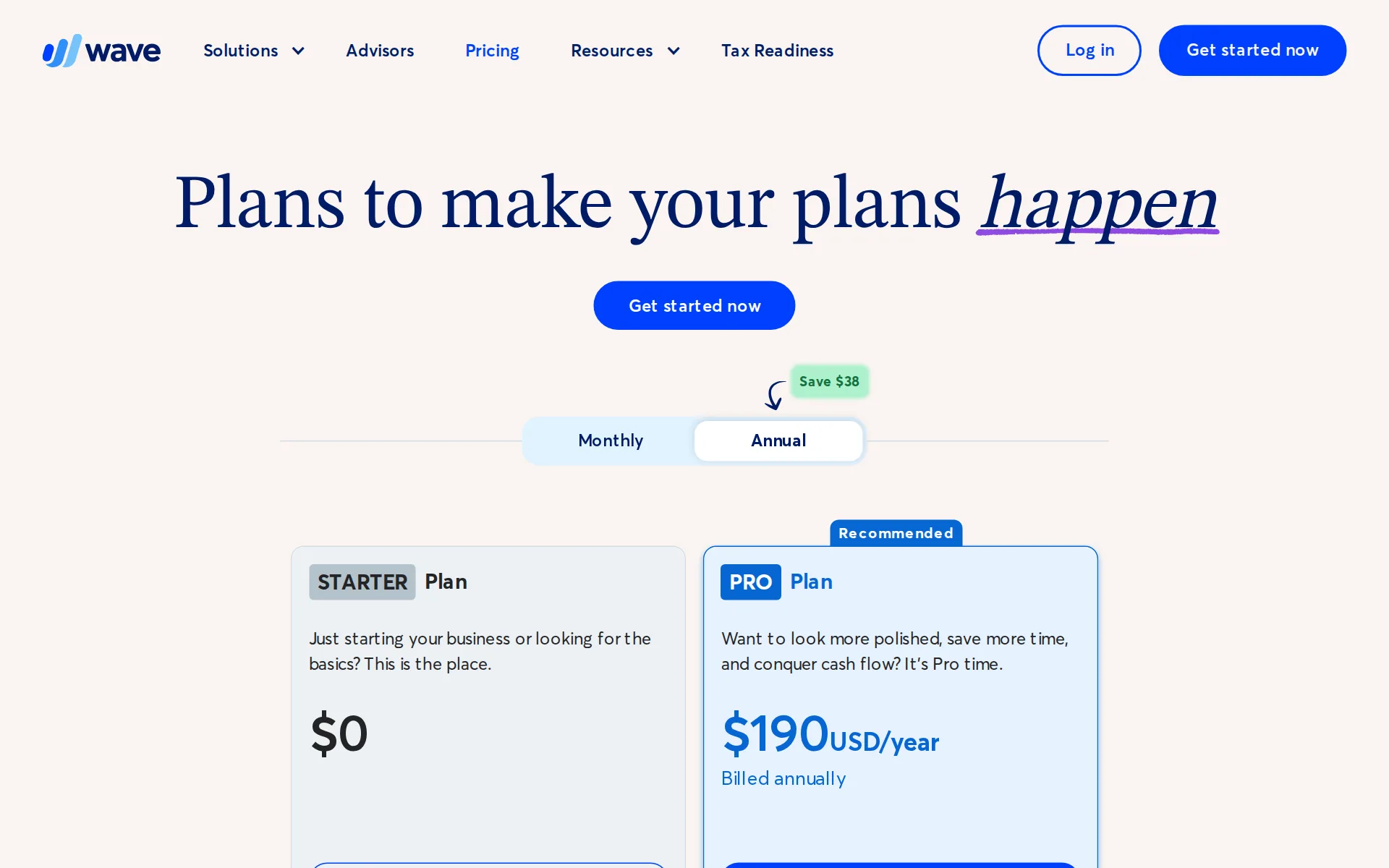
Pricing page, captured
waveapps.com/pricing, checked
What Wave costs at your volume
| Transactions a month | Cost | Plan |
|---|---|---|
| 100 transactions | $19 a monthon Pro | Pro |
| 500 transactions | $19 a monthon Pro | Pro |
What we checked on Wave
Cost at 100 transactions a month
$19 a month on Pro for 100 transactions. Pro is 50% off for 3 months for new customers ($9.50 a month), on offer until 6 January 2026. The figure is the regular $19, paid after it.
$19USD/month Billed monthly
waveapps.com/pricingChecked
Cost at 500 transactions a month
$19 a month on Pro for 500 transactions. Pro is 50% off for 3 months for new customers ($9.50 a month), on offer until 6 January 2026. The figure is the regular $19, paid after it.
On the page: Plan cards, Pro Plan column, price cell with the Monthly/Annual tab set to Monthly
waveapps.com/pricingChecked
Cost for a solo freelancer
A freelancer who wants bank imports and receipts pays $19 a month for the Pro Plan, which bundles both; the free Starter plan has neither.
$19USD/month Billed monthly ... Everything in Starter, plus…. Auto-import bank transactions*** Auto-merge and categorize bank transactions Digitally…
waveapps.com/pricingChecked
Promotion and regular price
promotion: the Pro card shows $9.50 for the first three months instead of $19, after which the regular $19 a month is charged.
PROMO: $19 $9.50USD/month† Save $28.50 off your first 3 months
waveapps.com/pricingChecked
Ledger included
Wave is the accounting software itself, so nothing else has to be bought for it to keep your books; it uses double-entry accounting.
Wave uses real, double-entry accounting software. Don’t know what that is? No sweat. Accountants do, and they’ll thank you for it.
waveapps.com/accountingChecked
What the price is based on
A flat fee charged once per business, not per owner or per user; a second business means a second subscription at the same rate.
The subscription fee for the Pro Plan is per business, not per owner.
waveapps.com/pricingChecked
Users included
The Pro Plan advertises unlimited user access with no stated per-seat charge, and invited people take admin, editor or viewer roles.
Unlimited user access Invite your accountant, bookkeeper, or payroll manager to collaborate securely.
waveapps.com/proChecked
Setup or onboarding fee
The Pro Plan is sold with no setup or hidden charge, and the payroll price list repeats that there are no set-up fees.
No hidden fees. Cancel anytime.
waveapps.com/proChecked
What the AI does
The automation Wave names is importing, merging and categorizing bank transactions and pulling the details off a photographed receipt; its pages never call any of this AI.
Automatically import and categorize bank transactions. Scan and digitize business receipts with OCR technology.
waveapps.com/proChecked
What the AI costs
included: the automatic categorization and the receipt reading both come inside the $19 Pro Plan, with no separate credit or add-on charge named.
Everything in Starter, plus…. Auto-import bank transactions*** Auto-merge and categorize bank transactions Digitally capture unlimited receipts and…
waveapps.com/pricingChecked
Categorizes transactions
Connected bank and card transactions are merged and categorized automatically on the Pro Plan; the pages do not say whether it learns from your corrections.
If you connect your bank account(s) to your Wave account, we’ll automatically merge and categorize your transactions, streamlining your bookkeeping.
waveapps.com/pricingChecked
Reconciles your accounts
Wave reconciles accounts as part of its own workflow, and the paid bookkeeping service does the reconciling for you each month instead.
Wave simplifies transaction uploads, categorization, and reconciliation, so your books stay more accurate.
waveapps.com/tax-seasonChecked
Reads receipts and bills
You can photograph, upload or email a receipt and Wave reads it and turns it into a bookkeeping record; it is included on Pro or $8 a month on its own.
Stay prepared for tax time with Wave’s receipts feature. Scan or upload receipts from Wave's mobile app, desktop, or email!
waveapps.com/receiptsChecked
Pays your bills
You can record bills on every plan, but paying them happens in a connected third-party check and payment tool rather than inside Wave, and no approval routing is described.
Import unpaid Wave invoices and vendor payees directly into Online Check Writer to print checks, send eChecks, or trigger ACH and wire payments.
waveapps.com/integrationsChecked
Sends invoices
Invoices and estimates are unlimited on the free plan, and customers can pay them by card or bank payment straight from the emailed invoice.
Create unlimited estimates, invoices, bills, and bookkeeping records
waveapps.com/pricingChecked
Accrual books and reports
Profit and loss, balance sheet and cash flow reports are generated on demand from double-entry books; the pages do not say whether those books are kept on an accrual basis.
Generate your profit & loss statement, balance sheet, and cash flow report automatically—no spreadsheets required.
waveapps.com/proChecked
People check the books
On Starter and Pro the checking is yours; only the separately priced Wave Advisors bookkeeping service puts an in-house bookkeeper on your books.
A dedicated bookkeeper to keep your books accurate and up to date
waveapps.com/pricingChecked
Your own bookkeeper
A named in-house bookkeeper based in North America comes with the Advisors bookkeeping package from $149 a month, not with the software plans.
Assigned in-house bookkeeper based in North America
waveapps.com/wave-advisorsChecked
Your accountant can sign in
You can invite an accountant, bookkeeper or partner as a collaborator, and the Pro Plan describes that user access as unlimited rather than charged per seat.
Grant trusted individuals—like partners, collaborators, or accountants—access to your Wave account as a payroll manager or Block Advisors tax pro…
waveapps.com/pricingChecked
Bank and card feeds
The Pro Plan connects to your bank through an outside connection provider and imports transactions by itself; the vendor warns not every institution can be connected.
If your bank allows you to connect to Wave with Plaid*** (the platform we use to facilitate bank connections), you can automatically import your…
waveapps.com/pricingChecked
Stripe
Shopify, Stripe and PayPal reach Wave only through the Make.com automation bridge on Pro
Yes. Wave Accounting integrates with Shopify, Stripe, and PayPal through Make.com, available on the Wave Pro plan. Wave also connects directly with…
waveapps.com/integrationsChecked
Shopify
Shopify, Stripe and PayPal reach Wave only through the Make.com automation bridge on Pro
On the page: Frequently Asked Questions, "Does Wave integrate with third-party apps like Shopify, Stripe, and PayPal?"
waveapps.com/integrationsChecked
PayPal
Shopify, Stripe and PayPal reach Wave only through the Make.com automation bridge on Pro
On the page: Frequently Asked Questions, "Does Wave integrate with third-party apps like Shopify, Stripe, and PayPal?"
waveapps.com/integrationsChecked
Square
the directory and its count of direct apps do not list Square or Gusto.
On the page: Frequently Asked Questions, "Does Wave integrate with third-party apps like Shopify, Stripe, and PayPal?"
waveapps.com/integrationsChecked
Gusto payroll
the directory and its count of direct apps do not list Square or Gusto.
On the page: Frequently Asked Questions, "Does Wave integrate with third-party apps like Shopify, Stripe, and PayPal?"
waveapps.com/integrationsChecked
Payroll
add-on: Wave sells its own payroll beside the plans, from $40 a month in the US plus $6 for each person paid, with tax payments and filings included.
$40 USD base fee + $6 per active employee + $6 per independent contractor paid
waveapps.com/payrollChecked
Moves your history in
Wave publishes step-by-step guides for moving in from QuickBooks, FreshBooks or a spreadsheet, and names no charge for doing it yourself.
Yes, switching from other accounting apps or products to Wave is easy! See our step-by-step guide here on how to switch to Wave from Quickbooks.
waveapps.com/accountingChecked
Platforms
web, ios, android: it runs in a browser with nothing to install, and the mobile app is published for iPhone and Android; no Windows or Mac program is offered.
Wave's tools are web-based, so you just need an Internet connection and browser—no installation is necessary for our online software!
waveapps.com/accountingChecked
Getting your books out
A free spreadsheet connection moves customers, products, invoices and transactions in and out of your books, but no full report or trial balance export is described.
Share data between custom sheets and your general ledger, reducing the need for manual uploads. Included free on all Wave plans.
waveapps.com/integrationsChecked
Files 1099s
The payroll add-on generates 1099-NEC forms for contractors you pay, but Wave's automatic tax filing service explicitly leaves 1099 filings out.
As part of our tax services, Wave will automatically transfer tax payments* and file the paperwork with your state tax agency and the IRS (excluding…
waveapps.com/payrollChecked
Mileage
Mileage is recorded in the separate Driversnote app, which syncs trips into Wave on the Pro Plan; Wave itself does not advertise trip tracking.
Record driving trips to help track business mileage and kilometres for your records.
waveapps.com/integrationsChecked
Billable time
Billable hours are logged in connected apps such as MinuteDock and turned into Wave invoices on Pro, rather than being tracked inside Wave.
Convert logged project hours into Wave invoices, with less manual re-entry.
waveapps.com/integrationsChecked
Several businesses
One login can hold several business profiles, but each business that wants the paid plan is subscribed and billed separately at the full rate.
A single Wave account can be used to manage multiple business profiles within it, and if you have e.g. three businesses under one account and want…
waveapps.com/pricingChecked
Canada
Available in the US and Canada (excluding Quebec).
On the page: Have a trusted advisor by your side, second footnote under the pricing cards
waveapps.com/wave-advisorsChecked
Australia
no UK or Australian terms exist.
Available in the US and Canada (excluding Quebec).
waveapps.com/wave-advisorsChecked
Free trial or free plan
The Starter plan costs nothing and is offered as the way to try the bookkeeping and invoicing basics on your own books before paying.
Sign up for the Starter Plan to take the bookkeeping and invoicing basics for a spin. Then, whenever you’re ready, upgrade to the Pro Plan to unlock…
waveapps.com/pricingChecked
Sign up without a sales call
You register and upgrade yourself from inside the product with an upgrade button; only the human bookkeeping service needs a booked call.
To upgrade to the Pro Plan, sign into Wave. Visit your dashboard or use your invoicing or accounting features, and click the peach “Upgrade now”…
waveapps.com/pricingChecked
Contract and cancelling
Month to month with no commitment: you can cancel yourself at any time and keep the plan until the billing period you paid for ends.
Yes, you can unsubscribe at any time! The cancellation of your subscription will take effect at the end of the billing period in which you cancel.
waveapps.com/pricingChecked
Support
Chat and email with a person on weekdays only, 9 AM to 4:45 PM Eastern, and on the free plan only if you buy an add-on; no phone line is offered.
Our support team is available through live chat or email Monday to Friday from 9 AM to 4:45 PM Eastern.
waveapps.com/pricingChecked
Wave alternatives
All 9 alternatives6 more alternatives
6 of the 9 publish a price.
- PilotNo list priceA bookkeeping and tax service for startups that pairs software-driven dashboards with human financial advisors.
- Booke AINo list priceAn AI bookkeeper that works inside QuickBooks Online and Xero to categorize transactions and match documents.
- SimpleAIFrom $79 a monthAI agents that extract, classify and reconcile accounting documents, then publish them into Xero or QuickBooks.
- QuickBooks OnlineFree, then $38 a monthIntuit's cloud ledger, now with Intuit Intelligence agents that categorize, reconcile and flag errors.


Sources and changes
Last changed
Sources on waveapps.com8
What changed on this page2
- Bookkeeping features, free plan, plan limits, prices, terms
- Bookkeeping features, plan limits
Is this yours?
Make it yours for free, then check who reads this page, marked as verified. You confirm it with an email at waveapps.com.
Report an error if a fact is wrong.